
Why Long Exposure Urban Fog Creates Stunning Night Photography
Long exposure urban fog photography is one of the most rewarding techniques for beginner photographers. It turns ordinary city streets into dreamlike, moody scenes — with glowing traffic lights, silky light trails, and an eerie calm that feels almost cinematic.
Here’s a quick-start summary to get you shooting tonight:
- Shutter speed: 5–30 seconds (start at 10s and adjust)
- Aperture: f/8 to f/11 for sharp detail
- ISO: 100 to keep noise low
- Gear: A sturdy tripod is non-negotiable
- Best conditions: Cool, humid nights after rain — fog diffuses city lights into a soft, atmospheric glow
- Shoot in RAW for maximum flexibility in post-processing
Fog does something remarkable for city photography. It acts like a giant softbox, wrapping streetlights and traffic signals in a hazy, glowing shell. The result is described by many photographers as “oddly satisfying — at once creepy and serene.”
The technique doesn’t require expensive gear or an epic location. Fine art photographer Lucas Zimmermann proved this by shooting traffic lights in Weimar, Germany — one of the most ordinary urban subjects imaginable — using just 5–20 second exposures. The results? Breathtaking.
You don’t need a dramatic setting. You need fog, a tripod, and patience.
Essential Gear for Long Exposure Urban Fog Photography
To capture the ethereal beauty of a city blanketed in mist, we need to move beyond handheld snapshots. Because we are dealing with shutter speeds that can last several seconds or even minutes, any slight vibration will ruin the shot.
The Sturdy Tripod
This is your most important piece of equipment. In a busy city environment, wind from passing cars or vibrations from subways can cause “camera shake.” We recommend a tripod with a hook on the center column where you can hang your camera bag for extra weight and stability. If you are shooting with a smartphone, don’t worry—you can still join the fun! Check out our guide on long exposure smartphone photography to see how mobile mounts can yield professional results.
Neutral Density (ND) Filters
While often used for daytime landscapes, ND filters are surprisingly useful for long exposure urban fog. If the city lights are particularly bright, a 6-stop or 10-stop filter allows us to extend our shutter speed even further without overexposing the highlights. This is how you get those ultra-smooth, “river-like” fog movements that look like a dream.
Remote Shutter Release and Manual Focus
Even the act of pressing the shutter button can cause a tiny blur. We suggest using a remote shutter release or the camera’s built-in 2-second or 10-second timer. Additionally, autofocus often fails in thick fog because there isn’t enough contrast for the lens to “grab” onto. Switch to manual focus and set your lens to infinity, or focus on a sharp “anchor” point like a nearby building or a stationary traffic light.
Mastering Camera Settings for Long Exposure Urban Fog
Getting the settings right is a balancing act. We want enough time to blur the fog and traffic, but not so much that the streetlights become blown-out white blobs.
The Settings Table
| Effect Desired | Shutter Speed | Aperture | ISO |
|---|---|---|---|
| Subtle Fog Movement | 2–5 Seconds | f/5.6 | 100 |
| Classic Light Trails | 5–15 Seconds | f/8 | 100 |
| Ethereal, Smooth Mist | 20–30+ Seconds | f/11 | 100 |
| Deep Depth of Field | 10 Seconds | f/16 | 200 |
We always aim for ISO 100. While modern cameras are great at high ISOs, long exposures naturally generate heat on the sensor, which leads to digital noise. Keeping the ISO low ensures the “creepy and serene” atmosphere isn’t ruined by grain. If you’re looking for more seasonal tips, see our advice on how to capture frozen beauty with winter long exposures.
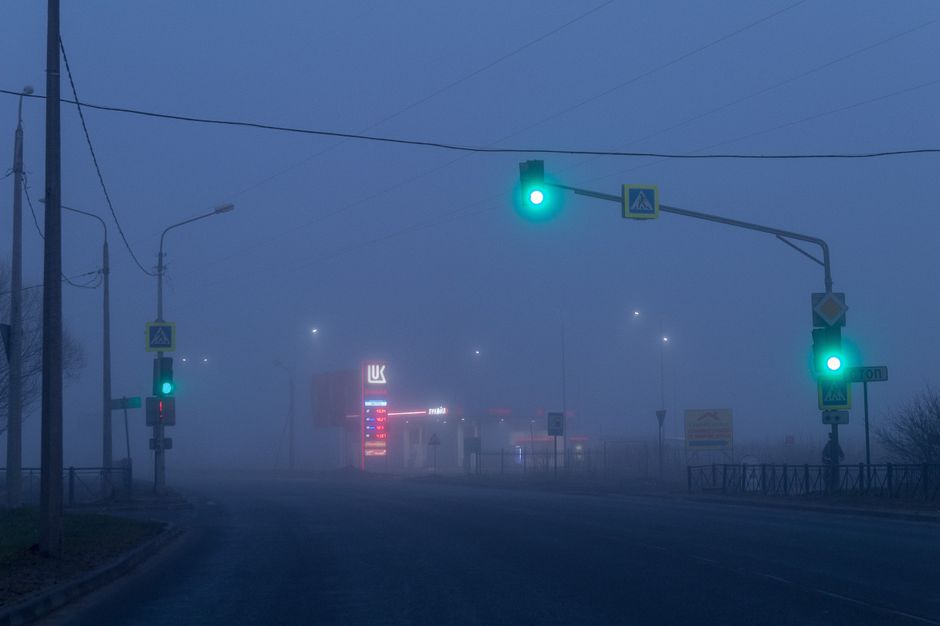
Capturing light trails in the mist
Vehicle streaks add a sense of life to an otherwise ghostly scene. When shooting at an intersection, wait for the light to turn green and for cars to start moving before you trigger the shutter. A 10-second exposure is usually enough to capture the full path of a car through the frame. In foggy conditions, these lights don’t just create lines; they create glowing tunnels of color. If you’re using a phone, there are top mobile camera apps for long exposure shots that simulate this effect beautifully.
Balancing exposure for urban glow
The biggest challenge in long exposure urban fog is “highlight clipping.” This happens when the bright bulbs of street lamps or neon signs become pure white with no detail. We recommend monitoring your histogram—that little graph on your screen. If the “mountains” are all pushed to the far right, your lights are too bright. Shorten your shutter speed or narrow your aperture (move from f/8 to f/11). For more mobile-specific help, read our long exposure tips for smartphone night photos.
Scouting and Composition: Finding the Perfect Scene
Great fog photography is 50% technical skill and 50% being in the right place at the right time. We can’t control the weather, but we can predict it.
Predicting long exposure urban fog conditions
We use tools like Windy and NOAA to track the dew point and humidity. When the temperature drops to meet the dew point, fog is likely to form. “Radiation fog” often happens on clear, calm nights after a rainy day, while “advection fog” (like the famous San Francisco “Karl the Fog”) rolls in from the ocean. Keep an eye on local webcams before you head out so you don’t waste a trip.
Best locations for long exposure urban fog photography
- San Francisco: The gold standard. Watching the marine layer roll over the Golden Gate Bridge is a rite of passage for photographers.
- London: The “Thames Mist” provides a classic, moody backdrop for the Big Ben and Tower Bridge.
- New York City: Skyscrapers poking through a low-hanging cloud deck create a “Blade Runner” aesthetic.
- Dubai: Known for spectacular “cloud inversions” where only the tops of the Burj Khalifa are visible.
Composition: Anchor, Flow, and Duration
When composing your shot, think about these three elements:
- Anchor: A sharp, stationary object (a bridge, a building, or a parked car) that gives the viewer’s eye a place to rest.
- Flow: The moving elements — the fog and the light trails.
- Duration: How much time you want to compress into a single frame.
Creative Techniques and Post-Processing
Once you’ve captured your RAW files, the magic happens in the digital darkroom.
The Lucas Zimmermann Style
Inspired by Zimmermann’s Traffic Lights series, you can focus on the “mundane as fine art.” By isolating a single traffic light in heavy fog and using a 20-second exposure, the light beams become physical pillars of red, yellow, and green. In post-processing, we often adjust the color temperature. Making the scene cooler (bluer) can enhance the “creepy” vibe, while warmer tones make the fog feel like a cozy blanket.
Noise Reduction and Clarity
Long exposures in the dark can lead to “hot pixels.” Most editing software has noise reduction sliders that can clean this up. However, be careful with the “Clarity” slider. Too much clarity can make the soft fog look “crunchy” and unnatural. We prefer using a bit of “Dehaze” (sparingly) to bring back detail in the buildings while keeping the fog soft. If you enjoy the movement of the sky, you might also like making the night sky spin with long exposures.
Safety while shooting in the city
Shooting long exposure urban fog usually means standing in the dark near traffic.
- Wear high-visibility gear: A simple reflective vest ensures drivers see you.
- Situational awareness: Don’t get so focused on your LCD screen that you forget your surroundings.
- Tripod placement: Never set up your tripod in a bike lane or a spot where it could trip a pedestrian.
- Shoot with a friend: Not only is it safer, but it’s also more fun to share the “oddly satisfying” moments with a fellow enthusiast.
Frequently Asked Questions about Long Exposure Urban Fog
How do I avoid noise in long exposure urban fog?
The best way is to keep your ISO at 100. Additionally, many cameras have a “Long Exposure Noise Reduction” (LENR) setting. When turned on, the camera takes a second “dark frame” to identify and subtract noise. It doubles your waiting time, but the results are much cleaner.
What shutter speed is best for moving fog?
For a smooth, painterly look where the fog looks like steam, aim for 20–30 seconds. If you want to see the actual “tendrils” or texture of the mist, keep it shorter—around 5–10 seconds.
Do I need ND filters for night photography?
Not always, but they are helpful. If you are in a bright area like Times Square, even at f/11 and ISO 100, your shutter speed might only be 1 second. Adding a 6-stop ND filter will push that to 64 seconds, giving you that beautiful, blurred “living electric cloud” effect.
Conclusion
At Pratos Delícia, we believe that the best photography comes from seeing the magic in the everyday. Long exposure urban fog allows us to slow down and capture the passage of time in a way our eyes can’t see on their own. Whether you are using a high-end DSLR or a smartphone, the city’s misty nights are a canvas waiting for your creative vision.
Ready to master more techniques? Explore our full photography guides to continue your journey into the art of the long exposure. Happy shooting!
