
What Is Long Exposure Photography and Why Should You Try It?
The complete guide to long exposure photography covers everything you need to create stunning images where water looks like silk, clouds streak across the sky, and city traffic becomes glowing rivers of light.
Here’s a quick overview of what long exposure photography involves:
- Mount your camera on a sturdy tripod so it stays perfectly still
- Set a slow shutter speed – from half a second to several minutes
- Use low ISO and narrow aperture (f/8-f/11) to control light
- Add an ND filter for daytime shots to avoid overexposure
- Trigger the shutter with a remote release to avoid camera shake
- Check your histogram after each shot and adjust as needed
The core idea is simple. Moving subjects blur. Still subjects stay sharp. That contrast is what makes long exposure images look magical.
You don’t need expensive gear to start. A basic camera with manual controls, a cheap tripod, and a willingness to experiment is enough to get your first great shot.
As photographer Ernst Haas put it: “I am not interested in shooting new things – I am interested to see things new.” Long exposure is exactly that kind of tool. It shows familiar scenes in a way our eyes never can.
Whether you want silky waterfalls, ghostly empty streets, or star trails across a dark sky – this guide walks you through every step.

Essential Gear for Your Complete Guide to Long Exposure Photography
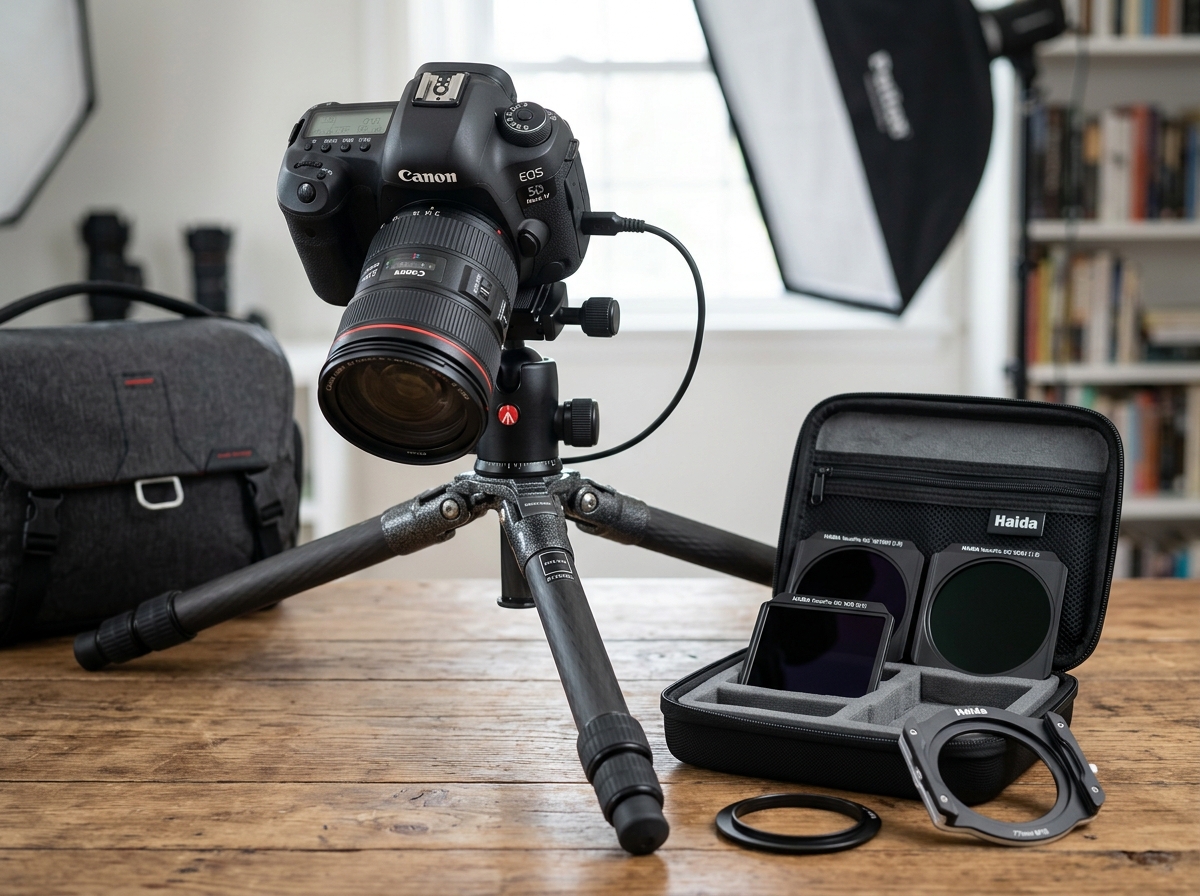
While we often say the best camera is the one you have with you, long exposure is a gear-dependent discipline. You are essentially fighting against the physics of light and motion, so having the right tools makes the difference between a blurry mess and a masterpiece.
The Foundation: A Sturdy Tripod
In this complete guide to long exposure photography, the tripod is the most critical piece of equipment. Because the shutter stays open for seconds or even minutes, the slightest vibration—even a gentle breeze—can ruin the sharpness of your stationary subjects. We recommend looking for a tripod that balances weight and stability. Carbon fiber is excellent for dampening vibrations, but a heavy aluminum tripod works just as well if you aren’t hiking miles with it.
Pro Tip: Avoid extending the center column if possible, as it makes the camera more prone to wobbling like a bobblehead.
The “Sunglasses”: Neutral Density (ND) Filters
If you try to leave your shutter open for 30 seconds at high noon, your photo will be a blinding white rectangle. ND filters are darkened glass plates that sit in front of your lens to block out light without changing the color of the scene. They come in different “strengths” measured in stops.
| Filter Strength | Light Reduction | Best Use Case |
|---|---|---|
| 3-Stop (ND8) | 8x less light | Golden hour, waterfalls, or smoothing slight ripples. |
| 6-Stop (ND64) | 64x less light | Bright overcast days, creating “misty” water. |
| 10-Stop (ND1000) | 1,000x less light | Bright daylight, stretching clouds, making people “disappear.” |
Remote Shutter Release and Bulb Mode
Even the act of pressing the shutter button with your finger can cause “shutter slap” or camera shake. A remote release (wired or wireless) allows you to trigger the shot without touching the camera. If you don’t have one, you can use the camera’s built-in 2-second or 10-second timer.
Most cameras cap their automatic shutter speed at 30 seconds. To go longer, you’ll need to switch to Bulb mode, which keeps the shutter open for as long as you hold the remote button down.
Lenses and Accessories
A wide-angle lens is the bread and butter of landscape long exposures. It allows you to capture the foreground, the horizon, and a vast expanse of sky to show off those cloud streaks. Don’t forget a microfiber cloth; a single stray water droplet on your filter can create a massive blur in a 2-minute exposure.
Mastering Technical Camera Settings and Setup
Once your gear is assembled, it’s time to dive into the settings. Long exposure is a game of precision. We want the cleanest, sharpest image possible, which means moving away from “Auto” mode.
- ISO 100 (or Lower): We always want the lowest native ISO. High ISO introduces digital noise (grain), and since long exposures naturally generate heat on the sensor (which also causes noise), we want to start as clean as possible.
- Aperture f/8 to f/11: This is usually the “sweet spot” for lens sharpness. While you might be tempted to go to f/22 to get a longer shutter speed, doing so often causes “diffraction,” which actually makes the image softer.
- Manual Focus: Autofocus struggles in the dark or when looking through a dark ND filter. Focus on your subject before you put the filter on, then switch to Manual Focus (MF) to lock it in place.
- Disable Image Stabilization: This sounds counterintuitive, but if your camera is on a tripod, the stabilization system can actually create movement by searching for vibrations that aren’t there. Turn it off!
- Mirror Lock-up (for DSLRs): If you’re using a DSLR, the physical mirror flipping up can cause a tiny vibration. Enabling mirror lock-up ensures the mirror moves well before the exposure starts.
- Shoot in RAW: This is non-negotiable. Long exposures often require white balance adjustments or shadow recovery in post-processing. RAW files hold much more data than JPEGs.
Checking your histogram is vital. Don’t trust the image on the LCD screen; in the dark, it always looks brighter than it actually is. Look for a histogram that isn’t “clipped” on either the left (pure black) or right (pure white) sides.
For those looking to take these settings into the dark, check out this night sky photography guide for specific tips on stars and galaxies.
Step-by-Step: Shooting Long Exposures in the Field
Execution is where the “patient” part of our title comes in. You might spend 30 minutes setting up for a single 4-minute shot.
- Scout and Plan: Use weather apps to check for cloud cover. A perfectly blue sky is actually boring for long exposures; you want patchy, moving clouds to create those beautiful streaks.
- Compose Your Shot: Set up your tripod and frame the scene. Look for a strong foreground element (like a rock or a pier) to anchor the image while the background moves.
- The Test Shot: Take a normal photo without any filters. Make sure the exposure is perfect and the focus is tack-sharp. Note the shutter speed of this test shot.
- Manage Light Leaks: On DSLRs, light can leak through the viewfinder during a long exposure and create purple or orange streaks. Use a viewfinder cap or a piece of black tape to cover it.
- Attach the Filter: Carefully screw on or slide in your ND filter. Be gentle so you don’t nudge the focus ring or the tripod.
Calculating Shutter Speed for Your Complete Guide to Long Exposure Photography
This is where the math happens. If your test shot was 1/100th of a second and you add a 10-stop ND filter, you need to double that time ten times.
- 1/100 -> 1/50 -> 1/25 -> 1/13 -> 1/6 -> 1/3 -> 0.6s -> 1.3s -> 2.5s -> 5s -> 10s.
Doing this in your head while standing in a cold wind is no fun. We recommend using top mobile camera apps for long exposure shots to do the heavy lifting. Apps like PhotoPills or dedicated ND calculators allow you to input your “base” shutter speed and filter strength to get the perfect “final” shutter speed instantly.
Creative Applications: From Silky Water to Ghostly Cities
Now that you have the technique down, what should you photograph? The possibilities are limited only by your imagination and your patience.
- Waterfalls and Seascapes: This is the most popular use. A 1-2 second exposure makes a waterfall look like flowing hair. A 30-second exposure on the coast turns crashing waves into a surreal, low-lying fog.
- Cloud Streaks: On a windy day, a 2-minute exposure will “stretch” the clouds, creating a sense of motion and leading the viewer’s eye toward the center of the frame.
- Light Trails: Find a bridge over a busy highway at night. A 15-30 second exposure will turn headlights into white ribbons and taillights into red ones.
- The Ghost Town Effect: Have you ever wanted to photograph a famous landmark without the tourists? If you use an extremely long exposure (several minutes) in broad daylight with a heavy ND filter, people walking through the frame will move too fast to be recorded by the sensor. They simply disappear, leaving you with an empty, ghostly city.
- Minimalist Motion: By smoothing out water and sky, you can isolate a single subject—like a lone pier or a buoy—creating a fine-art, minimalist look that feels incredibly peaceful.
If you’re wondering if you can do this without a heavy DSLR, you absolutely can! You can capture the night with smartphone long exposure using specialized apps that simulate the effect.
Troubleshooting and Post-Processing Techniques
Even with the best preparation, things can go wrong. Long exposures are taxing on your camera’s hardware.
Common Technical Hurdles
- Battery Drain: Long exposures eat battery life because the sensor has to stay powered up and “reading” for a long time. Always carry 2-3 spare batteries, especially in cold weather.
- Digital Noise: Heat builds up on the sensor during long exposures, creating “hot pixels” (bright red or blue dots). Most cameras have a “Long Exposure Noise Reduction” (LENR) setting. It works by taking a second “dark frame” of the same length to subtract the noise. Warning: If your shot was 5 minutes, the camera will be “busy” for another 5 minutes while it processes.
- Wind Vibration: If it’s windy, don’t hang a heavy bag from your tripod—it can act like a sail and cause more vibration. Instead, shield the camera with your body or keep the tripod legs low to the ground.
Post-Processing Tips
Once you’re back at your computer, you can enhance the “dreamy” quality of your shots.
- Black and White Conversion: Long exposures often look stunning in monochrome because the focus shifts from color to texture and form.
- Exposure Stacking: If you don’t have a 10-stop filter, you can take ten 1-second photos and blend them in Photoshop using the “Mean” stack mode. This simulates a 10-second exposure and significantly reduces noise. For mobile users, stacking smartphone astrophotography images is a great way to get clear, noise-free night shots.
Troubleshooting Tips for Your Complete Guide to Long Exposure Photography
- Color Shifts: Cheaper ND filters often leave a blue or magenta “cast” on your images. This is easily fixed in post-processing by adjusting the White Balance.
- Light Leakage: If you see strange light patterns that weren’t in the scene, check the gap between your filter and the lens. Square filter holders are notorious for this; a bit of black electrical tape can seal the edges.
- Soft Images: If your stationary objects aren’t sharp, check if you left Image Stabilization on or if the tripod was on soft ground like sand or mud.
Frequently Asked Questions about Long Exposure
Can I do long exposure photography during the day without filters?
It’s very difficult. Even at ISO 100 and f/22, a sunny day will likely only allow a shutter speed of 1/15th of a second, which isn’t long enough for most effects. You might be able to get away with it at “Blue Hour” (just after sunset), but for true daytime long exposures, an ND filter is a must.
Why are my long exposure photos coming out completely white?
This is overexposure. It usually happens because the shutter was open too long for the amount of light available. You need to either use a darker ND filter, a smaller aperture (higher f-number), or a shorter shutter speed. Use a calculator app to double-check your math!
How do I avoid blurry images when shooting on a tripod?
First, ensure the tripod is on solid ground. Second, use a remote release or the self-timer. Third, turn off Image Stabilization. Finally, if it’s a DSLR, use mirror lock-up. Even the wind hitting your camera strap can cause enough vibration to blur a long exposure, so we often tuck our straps away.
Conclusion
At Pratos Delícia, we believe that photography is as much about the process as it is about the final image. Long exposure photography forces us to slow down, observe the movement of the world, and wait for the perfect moment. It is a meditative practice that rewards the patient with images that feel otherworldly and timeless.
Mastering the complete guide to long exposure photography takes practice. Don’t be discouraged if your first few shots are too bright, too dark, or a bit soft. Every “fail” is just a lesson in how light works. Grab your tripod, find some moving water or drifting clouds, and start experimenting. Your artistic growth is just a few long minutes away.
Ready to dive deeper into photography? Master more photography techniques and continue your journey toward capturing the extraordinary.
