
What Is Long Exposure Star Photography (and How Do You Do It)?
Long exposure star photography is the technique of using a slow shutter speed — typically 15 to 30 seconds — to capture the faint light of stars against a dark night sky.
Here’s a quick-start summary to get you shooting tonight:
| Setting | Recommended Value |
|---|---|
| Shutter speed | 15-25 seconds (pinpoint stars) |
| Aperture | f/2.8 (as wide as possible) |
| ISO | 1600-3200 |
| Focus | Manual, on brightest star |
| Tripod | Required — no exceptions |
The basic steps:
- Find a dark location away from city lights
- Mount your camera on a sturdy tripod
- Set your lens to its widest aperture
- Use manual focus on a bright star
- Set shutter speed using the Rule of 500 (500 ÷ focal length = max seconds)
- Shoot in RAW for best editing results
There’s something almost magical about pointing a camera at the night sky and watching thousands of stars appear in a single frame. Stars that your naked eye can barely detect suddenly reveal themselves in vivid detail.
But getting there takes a little know-how. The Earth is constantly rotating, which means stars appear to move across the sky. Expose for too long, and those pinpoint stars turn into blurry streaks. Expose for too short, and you get a black frame with almost nothing in it.
The good news? You don’t need expensive gear. A basic camera, a kit lens, and a cheap tripod can produce jaw-dropping results — once you know the right settings and techniques.
This guide covers everything: gear, settings, focusing at night, planning your shoot, and even how to use your smartphone.
Essential Gear for Long Exposure Star Photography
When we first head out into the darkness, it’s easy to think we need a NASA-sized budget to capture the cosmos. We’ve got good news: you probably already own most of what you need. While high-end gear makes things easier, long exposure star photography is more about technique than a high price tag.
The Camera: Full-Frame vs. Crop Sensor
While any camera with manual controls will work, a full-frame sensor is the “gold standard.” These sensors are larger, which means they can handle higher ISO settings (like 3200 or 6400) with much less digital “noise” or grain. Modern mirrorless cameras like the Sony a7R V or Canon EOS R5 are incredible at this, but don’t count out your crop-sensor (APS-C) DSLR! You just might need to be a bit more careful with your ISO limits—usually keeping it under 1600 to avoid too much grain.
The Lens: Wide and Fast
We want a lens that can “see” as much of the sky as possible. An ultra-wide-angle lens (somewhere between 14mm and 24mm) is ideal. But focal length isn’t everything; we also need a “fast” lens. In photography speak, “fast” means a lens with a wide maximum aperture, like f/2.8 or even f/1.8. This allows the maximum amount of light to hit the sensor in the shortest amount of time. If you only have a kit lens (usually f/3.5), don’t worry! You can still get great shots; you’ll just need to push your ISO a little higher or your shutter speed a little longer.
The Tripod: Your Best Friend
In long exposures, a tripod isn’t just an accessory; it’s a requirement. Because the shutter will be open for 20 seconds or more, even the tiny vibration of your heartbeat would be enough to blur the stars if you were holding the camera. We recommend a sturdy tripod that won’t budge if a light breeze picks up. Pro tip: if your tripod has a hook on the center column, hang your camera bag from it to add extra weight and stability.
Accessories: The “Little Things”
- Remote Shutter or Intervalometer: Touching the camera to press the shutter button can cause “camera shake.” A remote trigger or a built-in intervalometer allows us to take photos without touching the device.
- Headlamp with Red Light: A red light helps us see our gear without destroying our “night vision” or the vision of other photographers nearby.
- Extra Batteries: Long exposures and cold night air drain batteries faster than a toddler drains a juice box. Always bring spares!
For those who want to dive deeper into the technical side, check out this guide on night sky photography without a telescope.

Mastering Camera Settings for Sharp Pinpoint Stars
To get those crisp, “tack-sharp” stars that look like diamonds on velvet, we have to move away from “Auto” mode. The camera’s brain isn’t designed to understand the void of space; it needs us to take the wheel.
Manual Mode and RAW Format
First, switch to Manual (M) Mode. This gives us total control over the “Exposure Triangle”: Aperture, Shutter Speed, and ISO. Secondly, always shoot in RAW format. RAW files capture all the data from the sensor without compressing it. This is vital because night photos often look flat or dark straight out of the camera, and RAW files give us the “data headroom” to brighten the stars and adjust colors later in software like Lightroom.
The Aperture (f-stop)
Set your aperture to the lowest number your lens allows (e.g., f/2.8 or f/1.4). We want the “window” of the lens to be wide open to gather every possible photon of starlight.
ISO: The Sensitivity Dial
ISO determines how sensitive the sensor is to light. For stars, we usually start at ISO 1600. If the image is too dark, we might bump it to 3200. Be careful, though—higher ISOs introduce noise. Full-frame cameras can often handle ISO 3200-6400 with ease, while crop sensors might start to look “crunchy” past 1600.
White Balance
While you can change this later in RAW, setting your White Balance to “Tungsten” or “Incandescent” (around 3200K to 4000K) in-camera will give the sky a pleasing, natural blue tint rather than a muddy yellow or orange.
Noise Reduction: Turn It Off?
Most cameras have a setting called “Long Exposure Noise Reduction.” While it sounds helpful, it works by taking a second “dark frame” of the same length after your photo. If you take a 30-second photo, the camera will lock up for another 30 seconds to process it. When we are shooting star trails or trying to catch a fleeting moment, this wait time can be frustrating. Many pros prefer to turn this off and handle noise during editing.
Exposure Comparison Table
| Sensor Type | Focal Length | Shutter Speed | Aperture | ISO |
|---|---|---|---|---|
| Full-Frame | 14mm | 25-30 sec | f/2.8 | 3200 |
| Full-Frame | 24mm | 15-20 sec | f/2.8 | 1600 |
| Crop (1.5x) | 10mm | 20-25 sec | f/3.5 | 1600 |
| Crop (1.6x) | 18mm | 10-15 sec | f/3.5 | 800-1600 |
Applying the Rule of 500 in Long Exposure Star Photography
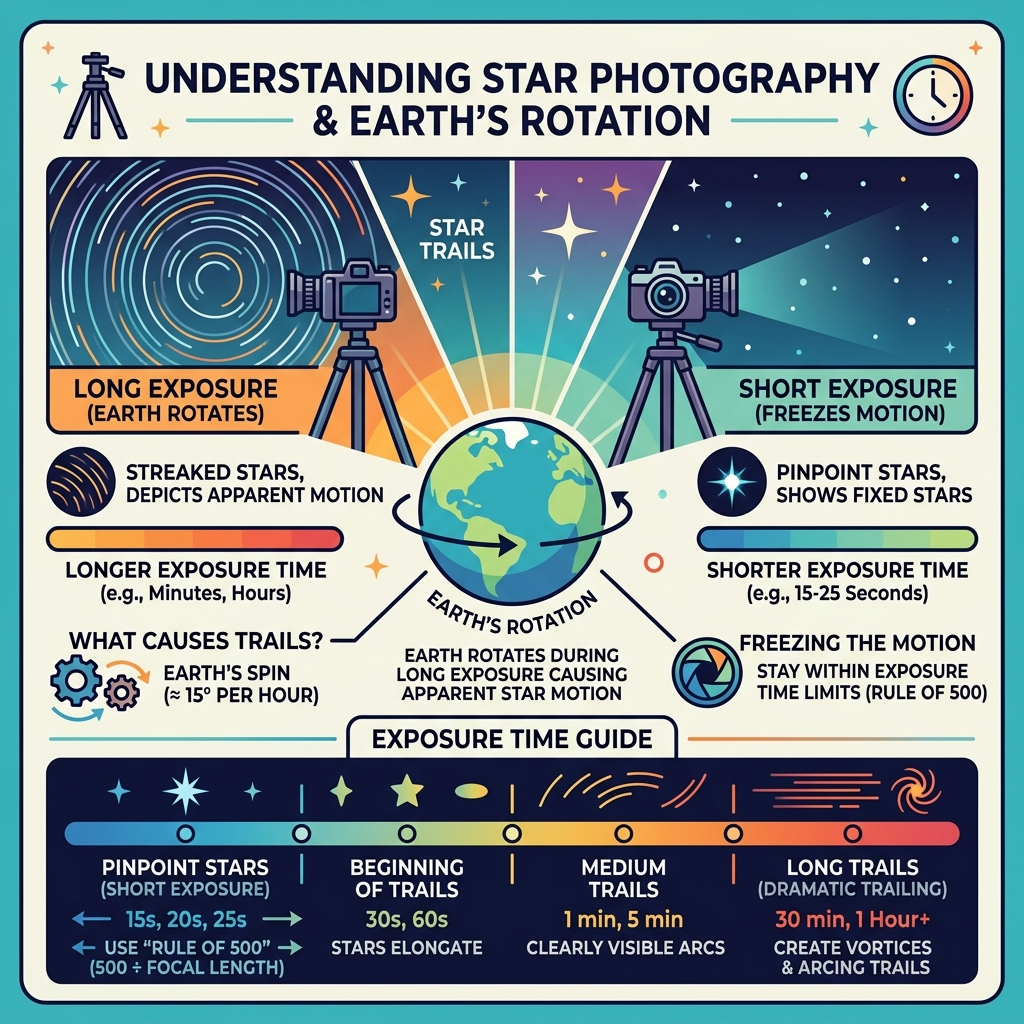
A challenge in long exposure star photography is the Earth’s rotation. If your shutter stays open too long, the stars will move across the sensor, creating small “tails” or blur. To prevent this, we use the Rule of 500.
The formula is simple: 500 ÷ Focal Length = Maximum Shutter Speed (in seconds).
For example, if we are using a 20mm lens on a full-frame camera:
- 500 ÷ 20 = 25 seconds.
If we go past 25 seconds, those stars will start to look like tiny sausages instead of points of light!
The Crop Factor Catch: If you are using a crop sensor camera (like a Canon Rebel or Nikon D5600), you must account for the “crop factor.” Canon sensors usually have a 1.6x multiplier, while Nikon/Sony APS-C sensors have a 1.5x multiplier.
- Example (Canon Crop): 18mm lens x 1.6 = ~29mm effective focal length.
- 500 ÷ 29 = 17 seconds.
Common Maximum Shutter Speeds (Full-Frame):
- 14mm: 35 seconds
- 16mm: 31 seconds
- 20mm: 25 seconds
- 24mm: 20 seconds
- 35mm: 14 seconds
- 50mm: 10 seconds
Note: Some modern high-resolution cameras are so sensitive that even the Rule of 500 is too slow. Many photographers now use the “Rule of 400” or even “Rule of 300” for even sharper results.
How to Focus Your Camera at Night
Your camera’s autofocus will almost certainly fail in the dark. It will “hunt” back and forth and never lock onto a star. We have to do this manually.
- Turn off Autofocus: Switch the button on your lens to “MF.”
- Use Live View: Turn on your camera’s screen (Live View) and find the brightest star in the sky.
- Magnify: Use the digital zoom button (usually a magnifying glass icon) to zoom in 5x or 10x on that specific star on your screen.
- Twist the Ring: Slowly turn the focus ring on your lens until that star becomes the smallest, sharpest point possible. If it looks like a “bokeh” donut, you’ve gone too far!
- Tape it Down: Once you find that “sweet spot” (often just before the infinity symbol ∞), use a piece of gaffer tape to secure the focus ring so it doesn’t move during the night.
For more beginner-friendly advice, see our night sky photography a beginners guide.
Planning Your Shoot: Moon Phases and Light Pollution
You could have the best gear in the world, but if you try to shoot the Milky Way from the middle of Times Square during a full moon, you’re going to have a bad time. Planning is 90% of the battle in long exposure star photography.
The Bortle Scale: Finding True Dark
Light pollution is the glow from city lights that drowns out the stars. We use the Bortle Scale to measure darkness, ranging from Class 9 (Inner-city) to Class 1 (Pristine dark sky). For the best results, we want to find a location that is Bortle Class 4 or lower. There are many “Light Pollution Maps” available online to help you find these dark pockets.
The Moon: The Sky’s Giant Lightbulb
The moon is beautiful, but for star photography, it’s a giant spotlight that washes out the faint light of the Milky Way.
- New Moon: This is the best time to shoot. The sky is at its darkest.
- Moon Phase < 20%: A small crescent moon can actually be helpful, as it provides just enough light to illuminate your foreground (like trees or mountains) without drowning out the stars.
- Full Moon: Great for landscape shots that look like daytime, but terrible for seeing stars.
Essential Planning Apps
We don’t just guess where the stars will be; we use technology:
- PhotoPills: The “Swiss Army Knife” for night photographers. It tells you exactly where the Milky Way will rise and set, and even has an Augmented Reality (AR) mode to show you the stars through your phone’s camera.
- The Photographer’s Ephemeris (TPE): Excellent for planning how light will hit the landscape.
- Clear Outside: A weather app designed specifically for astronomers that tracks cloud cover at different altitudes.
For more on the “when,” read our timing tips for capturing stars.
Advanced Techniques: Star Trails and Light Painting
Once you’ve mastered pinpoint stars, it’s time to get creative. Instead of fighting the Earth’s rotation, we can embrace it to create star trails—those stunning circular patterns that show the passage of time.
Capturing Star Trails with Long Exposure Star Photography
There are two ways to do this:
- The Single Long Exposure: You leave the shutter open for 30, 60, or even 120 minutes. This is risky; if a car drives by and shines its lights into your lens at minute 59, the whole shot is ruined. It also generates a lot of sensor heat and noise.
- The Stacking Method (Recommended): We take a series of shorter exposures (e.g., 100 photos at 30 seconds each) and “stack” them using software like StarStax or Photoshop. This method is much safer and results in cleaner images.
To get those perfect concentric circles, point your camera toward the North Star (Polaris) in the Northern Hemisphere. All other stars will appear to rotate around this fixed point.
Light Painting: Illuminating the Foreground
A photo of just stars can be a bit boring. Adding a foreground element—like an old barn, a lonely tree, or a rock formation—gives the photo “scale.” But since it’s dark, the foreground will often be a black silhouette.
Light painting is the technique of using a handheld flashlight or even your phone’s light to “paint” light onto the foreground object during the long exposure.
- Pro Tip: Don’t shine the light directly from the camera’s position; it will look flat. Walk to the side and “skim” the light across the subject to reveal texture and depth. Only a few seconds of light is usually enough!
To learn more about the editing side of this, check out star trail image editing: a new dimension to the night sky.
Smartphone Astrophotography for Beginners
Wait, can you really do long exposure star photography with a phone? Yes! While a phone won’t beat a full-frame DSLR for professional prints, modern smartphones are surprisingly capable.
iPhone Night Mode
If you have a recent iPhone, you have Night Mode.
- Use a Tripod: This is critical. When the iPhone detects it is perfectly still (on a tripod or leaned against a rock), it allows the Night Mode timer to go up to 30 seconds. If you hold it in your hand, it usually maxes out at 10 seconds.
- Raw Power: Enable “Apple ProRAW” in your settings. This gives you much more control when you edit the photo in the Lightroom Mobile app.
- The Shutter: Use a Bluetooth remote or the volume buttons on your headphones as a shutter release to avoid shaking the phone.
Android and “Pro” Modes
Many Android phones have a “Pro” or “Manual” mode that allows you to set the shutter speed (30s), ISO (1600), and Focus (Infinity) manually. Google Pixel phones even have a dedicated “Astrophotography Mode” that takes multiple exposures and stacks them automatically!
Explore more in our guides on how to photograph stars with your phone and unlocking the galaxy with a smartphone.
Frequently Asked Questions about Night Sky Photography
Why are my stars appearing as blurry lines instead of dots?
This is almost always due to one of two things:
- The Shutter Speed is too long: You’ve exceeded the Rule of 500, and the Earth’s rotation is becoming visible.
- Camera Shake: Even a sturdy tripod can shake if it’s windy or if you touched the camera to take the photo. Use a 2-second timer or a remote release.
What is the best ISO setting to avoid image noise?
There is no “perfect” number, but ISO 1600 is the sweet spot for most cameras. If your image is too dark at f/2.8 and 20 seconds, you’ll have to go to ISO 3200. It’s better to have a slightly noisy, bright photo than a “clean” dark photo that you have to brighten later (which actually creates more noise!).
Can I capture the Milky Way with a standard kit lens?
Absolutely! While an f/2.8 lens is better, an 18-55mm f/3.5 kit lens can still capture the Milky Way. You will just need to use a higher ISO (3200) and ensure you are in a very dark location (Bortle 1-3).
Conclusion
Mastering long exposure star photography is a journey that requires patience, a bit of warm clothing, and a willingness to experiment. There is nothing quite like the feeling of standing in the silence of the night, clicking the shutter, and seeing the hidden wonders of the universe appear on your small camera screen.
The best camera is the one you have with you—whether it’s a professional mirrorless setup or the smartphone in your pocket. Get away from the city lights, look up, and start shooting. The stars aren’t going anywhere, but the memories you capture will last a lifetime.
For more tips on mastering your camera in any condition, explore more expert photography guides from us at Pratos Delícia. Happy shooting!
