
Stop Shaky Video for Good: Your Guide to Smartphone Steady Arm Devices
Smartphone steady arm devices are tools that keep your phone stable while you shoot video or photos — and choosing the right one can instantly transform your footage from shaky home video to smooth, cinematic content.
Here are the main types available right now:
| Device Type | Best For | Price Range |
|---|---|---|
| 3-axis gimbal | Vlogging, walking shots, tracking | $65–$270 |
| Flexible tripod | Low angles, creative mounts | $15–$50 |
| 4-in-1 handgrip/monopod | Travel, selfies, group shots | $20–$80 |
| Locking clamp mount | Fixed mounting (bikes, handlebars) | $25–$60 |
| Auto-tracking stabilizer | Hands-free solo filming | $99–$269 |
Even smartphones with built-in optical stabilization can’t fully eliminate shake when you’re walking, running, or panning fast. As PCMag puts it, even the best built-in systems “cannot quite achieve the Steadicam look.”
That’s exactly where these devices come in.
Whether you’re shooting night sky time-lapses, travel vlogs, or live streams, the right stabilizer makes a huge difference — without requiring a professional film crew.
Understanding Smartphone Steady Arm Devices and How They Work
When we talk about smartphone steady arm devices, we are usually referring to a sophisticated piece of hardware known as a gimbal. But how does a handheld stick manage to make your video look like it was filmed on a Hollywood closed set? It all comes down to a tiny, high-speed “brain” and some very hard-working motors.
Inside a modern 3-axis gimbal, you’ll find brushless motors. Unlike older brushed motors, these are incredibly quiet and responsive. They work in tandem with an Inertial Measurement Unit (IMU), which consists of gyroscopes and accelerometers. These sensors detect movement thousands of times per second. If the sensor feels your hand tilt forward (pitch), the motor instantly moves the phone backward by the exact same degree to keep it level.
The Three Axes of Stability
To achieve true “floating” footage, these devices counteract movement across three planes:
- Pan (Yaw): Left-to-right movement.
- Tilt (Pitch): Up-and-down movement.
- Roll: Side-to-side rotation.
While most modern phones have Electronic Image Stabilization (EIS) or Optical Image Stabilization (OIS), these are limited. EIS often crops your image, reducing quality, while OIS can only move the lens a few millimeters. A mechanical steady arm can move the entire phone through hundreds of degrees of rotation.
For those who don’t need active motors, mechanical stabilizers like affordable tripods for night sky photography provide a physical “steady arm” by creating a wide, weighted base. This is essential for long-exposure shots where even the vibration of a passing car could ruin the image.
Essential Features of Modern Smartphone Steady Arm Devices
If you are browsing the Amazon best sellers list, you’ll notice that smartphone steady arm devices have evolved far beyond simple handles. They are now all-in-one production studios.
AI Tracking and Smart Sensors
One of the most exciting leaps in technology is AI tracking. Devices like the Hohem iSteady V3 or the Insta360 Flow 2 Pro use dedicated AI vision sensors. These allow the device to “lock on” to a subject—whether it’s a person, a pet, or a moving car—and follow them automatically. The best part? Some models, like the Hohem iSteady M7, have on-device AI that works with your native camera app, so you aren’t forced to use a third-party app that might lower your video resolution.
Battery Life and Power Management
Battery performance varies wildly across the market. On the high end, the Moza Mini MX 2 offers a staggering 24 hours of use, while the DJI Osmo series typically clocks in around 10 hours. Many premium models now offer “reverse charging,” meaning the gimbal acts as a power bank to keep your phone charged while you film—a lifesaver for long travel days.
Payload and Reach
The “payload” refers to how much weight the motors can handle. Standard gimbals usually support up to 300g, but heavy-duty models like the Hohem iSteady M7 can handle up to 500g. This is crucial if you plan on using external lenses or heavy cases. Additionally, many modern arms feature built-in extension rods (often around 205mm to 215mm), essentially turning your stabilizer into a “smart” selfie stick for better high-angle or group shots.
Compatibility Considerations for Smartphone Steady Arm Devices
Before you click “buy,” we recommend checking your phone’s physical dimensions. Most stabilizers accommodate widths between 58mm and 98mm. If you own a foldable phone, like the Samsung Galaxy Z Fold or Huawei Mate X5, you’ll need a device with a higher payload and a wider clamp. Also, consider your case; thick, rugged cases can sometimes interfere with the magnetic mounting systems favored by brands like DJI.
Top Categories of Stabilization Solutions for Content Creators
Not every creator needs a motorized gimbal. Depending on your niche, a different type of smartphone steady arm device might be a better fit.
1. Motorized 3-Axis Gimbals
These are the gold standard for vlogging and cinematic “walk-and-talk” videos. Brands like DJI, Hohem, and Insta360 dominate this space. They offer the smoothest footage but require battery power and occasional calibration.
2. Flexible and Tabletop Tripods
For those who need to mount their phone in unusual places—like a tree branch, a fence, or a bike handle—flexible tripods are unbeatable. The GripTight GorillaPod Stand PRO is a classic example, using rubberized, wrappable legs to provide stability on uneven surfaces.
3. Multi-Function Handgrips
Devices like the iKlip Grip Pro act as a 4-in-1 tool: a desktop tripod, a monopod, a tripod adapter, and a handheld stabilizer. These are fantastic for travelers who want to pack light but still need a steady hand for photos and videos.
4. Heavy-Duty Locking Mounts
If you are filming from a motorcycle, a stroller, or a music stand, you need something that locks down. The LockVise Universal Locking Phone Holder uses a key-locking mechanism and aerospace-grade materials to ensure your phone doesn’t budge, even under heavy vibration.
5. Professional Rigs and Cages
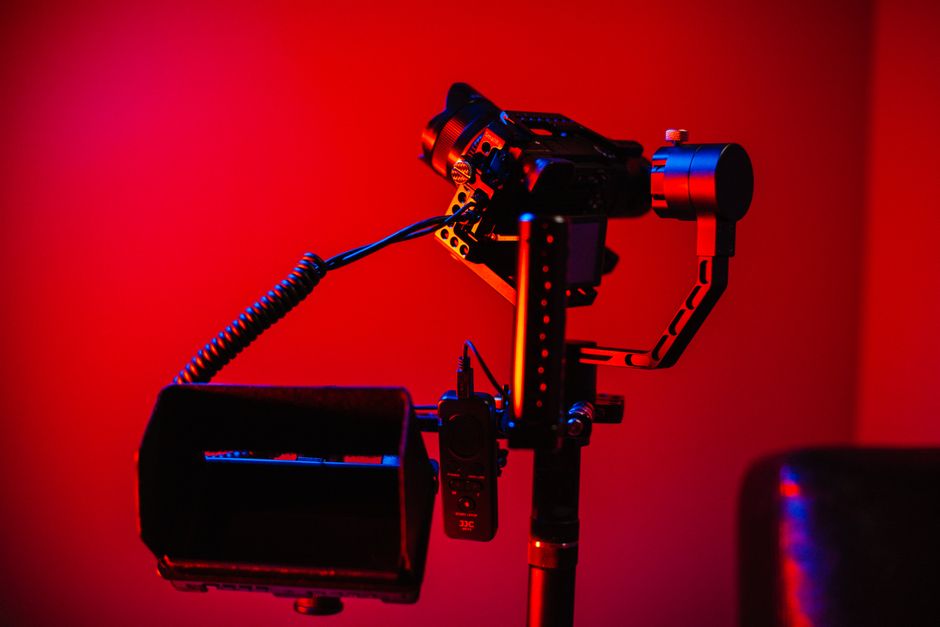
For filmmakers who want to attach microphones, LED fill lights, and external monitors, a multi-functional mount like Phil from 3 Legged Thing is essential. These often feature cold-shoe mounts and industry-standard 1/4″-20 threads.
How to Choose the Right Device for Your Creative Needs
Choosing from the dozens of smartphone steady arm devices available can feel overwhelming. We suggest starting with your primary use case.
- For the Solo Vlogger: Look for a gimbal with AI tracking and a built-in extension rod. This allows the camera to follow you while you move, and the extension rod helps you get more of the background in the frame.
- For the Travel Photographer: Portability is king. Look for foldable models like the Hohem iSteady X3, which can fit into a jacket pocket.
- For the Night Sky Enthusiast: Stability over time is more important than movement. You’ll want a solid tripod and perhaps one of the best smartphone gimbals for night photography that features a “timelapse” or “star tracking” mode.
- For the Action Sports Athlete: Look for a locking clamp mount with a multi-angle arm that can withstand shocks and high speeds.
Professional Techniques for Smartphone Steady Arm Devices
Once you have your device, you can start using professional “modes” to level up your content:
- Inception Mode: The gimbal rotates the phone 360 degrees while moving forward, creating a dizzying, dream-like effect.
- Dolly Zoom (Vertigo Effect): You walk backward while the camera zooms in (or vice versa), making the background appear to shrink or grow around the subject.
- Underslung Mode: Flipping the gimbal upside down to get “pet’s eye view” shots just inches from the ground.
- Gesture Control: Holding up a “V” sign to start recording or a palm to stop—perfect for solo creators.
Frequently Asked Questions about Smartphone Steady Arm Devices
What is the difference between a gimbal and a stabilizer?
While the terms are often used interchangeably, a gimbal is a type of active stabilizer that uses motors and electricity to keep the phone level. A “stabilizer” is a broader category that includes passive devices like weighted handles, tripods, and shoulder rigs that use physics rather than motors to reduce shake.
How long do the batteries typically last on these devices?
Most modern smartphone steady arm devices last between 8 and 12 hours. However, budget models might only offer 4–6 hours, while “marathon” models like the Moza Mini MX 2 can last up to 24 hours. That using features like the built-in fill light or AI tracking will drain the battery significantly faster.
Can I use these devices with heavy professional lenses attached to my phone?
Yes, but you must check the “payload capacity.” If your phone plus the lens exceeds the motor’s limit (usually around 280g–300g for standard models), the motors will overheat and the gimbal will go limp. For heavy setups, we recommend professional-grade stabilizers like the Hohem iSteady M7 or the DJI RS series, which are built for higher weight limits.
Conclusion
At Pratos Delícia, we believe that everyone has a story worth telling, and shaky footage shouldn’t stand in the way of that. Investing in one of these smartphone steady arm devices is the single fastest way to improve your production value.
Whether you’re looking for the high-tech AI tracking of a Hohem iSteady V3 or the rugged reliability of a LockVise mount, there is a tool designed for your specific vision. Remember to keep your firmware updated, balance your phone properly before turning the power on, and most importantly, don’t be afraid to experiment with new angles.
Ready to take your mobile filmmaking to the next level? Explore more professional gear at Pratos Delícia and start capturing the world in smooth, cinematic detail.
