
Why Getting Your Nikon Astrophotography Settings Right Makes All the Difference
Nikon astrophotography settings can feel overwhelming at first — but the right starting point is simpler than you think.
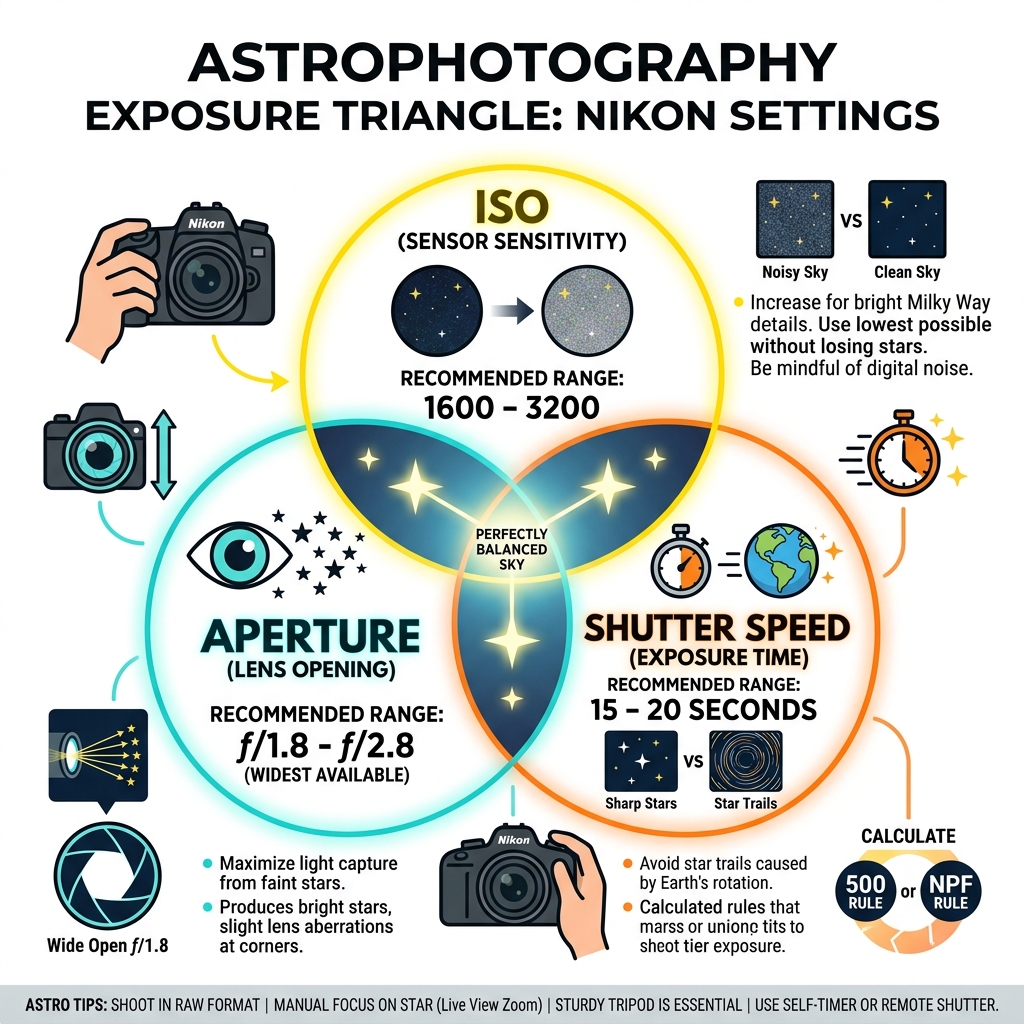
Here are the core settings to use on your Nikon camera for night sky photography:
| Setting | Recommended Value |
|---|---|
| Mode | Manual (M) |
| Aperture | f/1.8–f/2.8 (widest available) |
| Shutter Speed | 15–20 seconds (use 500 Rule or NPF Rule) |
| ISO | 1600–3200 |
| Focus | Manual, zoomed on brightest star in Live View |
| File Format | RAW (14-bit uncompressed) |
| White Balance | ~3800K |
The night sky doesn’t wait around. Earth’s rotation means stars start trailing across your frame in as little as 20 seconds. Too high an ISO and your image looks like static. Too narrow an aperture and you capture nothing but darkness.
It’s a tricky triangle to balance — especially in the pitch black, with cold hands and no reference point in sight.
One astrophotographer described their first shoot perfectly: they printed out a blog post, drove out to a dark field, and still came home with blurry, noisy shots. Sound familiar?
The good news: with the right Nikon settings and a clear workflow, sharp and stunning Milky Way shots are absolutely within reach — even for beginners.
Essential Gear for Nikon Night Sky Photography
Before we dive deep into the menu buttons, we need to talk about the “throne” your camera sits on. In astrophotography, your tripod is just as important as your sensor. Any micro-vibration caused by wind or even the physical act of pressing the shutter button will turn a sharp star into a blurry smudge.
The Nikon Lens Kit
For wide-field shots of the Milky Way, we want to let in as much light as possible.
- 14-24mm f/2.8: This is the gold standard for many Nikon users. At 14mm, you can capture a massive sweep of the sky and use longer shutter speeds before the stars start to trail.
- 24-70mm f/2.8: While not as wide, this is a fantastic “workhorse” lens. If you use this, you’ll just need to be more careful with your shutter speed calculations to avoid star movement.
- 20mm f/1.8 Prime: A favorite for many because that f/1.8 aperture allows you to keep your ISO lower, resulting in cleaner images.
Stability and Control
To keep things rock-steady, we recommend using a remote shutter release or a DC-2 wired remote. If you don’t have one, don’t panic! You can use the built-in exposure delay mode or a 2-second self-timer to ensure the camera has stopped shaking from your touch before the shutter opens.
Lastly, never forget your red headlamp. White light ruins your night vision (and the vision of any other photographers nearby), taking your eyes about 20 minutes to readjust. A red light allows you to see your dials without the “blindness” penalty. For more on the basics, check out our night-sky-photography-a-beginners-guide.

Mastering Your Nikon Astrophotography Settings
When the sun goes down, “Auto” mode becomes useless. We need to take full control. Start by switching your camera to Manual (M) mode. This allows us to dictate exactly how much light hits the sensor, which is the fundamental principle of astrophotography.
Crucially, you must set your file format to RAW (14-bit uncompressed). JPEG files throw away too much data. In the dark shadows of a night sky photo, that data is exactly what we need to pull out the colors of the Milky Way during editing.
The Math of Motion: 500 Rule vs. NPF Rule
Since the Earth is spinning, stars will appear to move if your shutter is open too long. To find your maximum shutter speed, we use two main methods:
| Rule | Calculation | Pros/Cons |
|---|---|---|
| 500 Rule | 500 ÷ Focal Length | Simple and fast; can lead to slight trailing on high-res sensors. |
| NPF Rule | Complex (Factors pixel pitch & aperture) | Extremely accurate for modern cameras like the Z7 II or D850. |
For a 14mm lens on a full-frame Nikon, the 500 Rule suggests about 35 seconds. However, most experts find that 20–25 seconds is the “sweet spot” for truly pinpoint stars.
Optimal ISO and Aperture for Nikon Astrophotography Settings
To capture the faint glow of distant galaxies, we need to open the “eye” of the lens as wide as it goes. Set your aperture to f/2.8 (or f/1.8 if your lens allows). While some lenses are a bit “soft” or show coma (stars looking like seagulls) at their widest setting, modern NIKKOR Z lenses are often sharp right from the start.
For ISO, start at 1600 or 3200. Many modern Nikon sensors, like those in the Z6 II, are “ISO invariant.” This means you can often shoot at a slightly lower ISO to preserve highlights and then “brighten” the image in post-processing without adding extra noise. If you’re using a specialized body like the Nikon D810A, you have the added benefit of a dedicated optical filter that captures the red H-alpha nebulae light much better than a standard camera.
Saving Your Custom Nikon Astrophotography Settings
Fiddling with dials in the dark is a recipe for frustration. On Nikon Z-series cameras, you can save your Nikon astrophotography settings to User Modes (U1, U2, or U3).
- Set your ISO, Aperture, Shutter, and White Balance.
- Go to the Setup Menu -> Save User Settings. Now, when you arrive at your dark sky site, you just click the dial to U1, and you’re ready to shoot.
For those doing extremely long exposures with a star tracker, Nikon’s Bulb mode and M* Manual mode (on models like the D810A or D850) allow for exposures up to 900 seconds without needing an external timer. Don’t forget to use the Virtual Horizon on your LCD to make sure your Milky Way isn’t leaning at a weird angle!
Advanced Techniques: Focusing and Stacking
Autofocus is essentially blind in the dark. If you rely on it, you’ll end up with a blurry mess.
How to Manually Focus on Stars with Nikon Z-Series
- Find a bright target: Look for a bright star, a distant planet (like Jupiter), or even a far-off city light.
- Use Live View Magnification: Zoom in to the maximum level on your LCD screen.
- Adjust the Focus Ring: Slowly turn the ring until the star becomes the smallest, sharpest point of light possible. If it looks like a “donut” or a large blurry ball, you’re out of focus.
- Lock it down: Some photographers use a small piece of gaffer tape on the lens barrel to ensure the focus doesn’t budge during the night.
On Nikon Z cameras, Focus Peaking can also help, highlighting the sharpest edges in a bright color (like red), though magnified Live View is usually more precise for stars. To further reduce vibration, enable the Electronic Front-Curtain Shutter.
Stacking RAW Images for Noise Reduction
Even at ISO 3200, a single image can look “grainy.” The secret to those professional, silky-smooth Milky Way shots is stacking. Instead of taking one 20-second photo, you take 10, 20, or even 100 identical photos using the built-in intervalometer.
Software like Sequator (for Windows) or Starry Landscape Stacker (for Mac) looks at all those photos, identifies the stars, and “averages” the noise out. This process effectively gives you the signal of a much longer exposure without the star trails.
You can also take “Dark Frames” — photos taken with the lens cap on at the same settings — to help the software identify and remove sensor-related noise and hot pixels. For a deeper dive into low-light management, see our guide on mastering-your-camera-settings-for-low-light-photography.
Planning and Post-Processing for the Night Sky
You can have the best Nikon astrophotography settings in the world, but if you shoot during a full moon or a cloudy night, it won’t matter.
- Planning: Use apps like PhotoPills or Stellarium to see exactly where the Milky Way “core” will be. The core is most visible between March and October in the Northern Hemisphere.
- White Balance: While you can change this later in RAW, setting it to 3800K in-camera helps you see a more natural-looking preview on your LCD.
- Lightroom Adjustments: When you get home, focus on the “Dehaze” and “Clarity” sliders to make the stars pop. Use a radial filter on the Milky Way core to boost the whites and shadows slightly, bringing out those celestial dust clouds.
Frequently Asked Questions about Nikon Astrophotography
Should I use Long Exposure Noise Reduction?
Long Exposure Noise Reduction (LENR) works by taking a second “dark frame” immediately after your shot. If your exposure was 20 seconds, the camera will “lock up” for another 20 seconds to process. Our advice: Turn it OFF if you are stacking images. It wastes precious shooting time and drains your battery. If you are only taking a single shot and don’t plan to stack, then LENR can be helpful for removing hot pixels.
How do I avoid star trails on a Nikon crop sensor?
If you are using a DX-format camera like the Nikon D3400 or Z50, you have to account for the 1.5x crop factor. The 500 Rule changes: 500 ÷ (Focal Length x 1.5). For example, an 18mm lens on a crop sensor behaves like a 27mm lens. Your max shutter speed would be about 18 seconds (500 / 27), rather than the 27 seconds you’d get on a full-frame body.
What is the best Nikon lens for the Milky Way?
The NIKKOR Z 14-24mm f/2.8 S is widely considered the king of the Z-mount. It has incredible coma control, meaning stars in the corners of your image still look like dots rather than smeared lines. For DSLR users, the 20mm f/1.8G ED is a fantastic, lightweight, and affordable option that lets in a massive amount of light.
Conclusion
Mastering Nikon astrophotography settings is a journey of patience and practice. It’s about more than just numbers; it’s about standing under a vast, silent sky and capturing a piece of the universe. At Pratos Delícia, we believe that with a sturdy tripod, a bit of planning, and the right manual configurations, anyone can turn a dark night into a masterpiece.
Don’t be afraid to experiment. If your first shots are too dark, bump the ISO. If the stars are trailing, shorten the shutter. Every location and camera body is slightly different, and the “perfect” setting is the one that works for you in that moment. Start your photography journey here and keep reaching for the stars!
