
Triggering the Stars Without Touching Your Camera
Why a Remote Star Photography Setup Changes Everything
A remote star photography setup lets you control a telescope from your home — imaging deep-sky objects under dark, clear skies without ever leaving your couch.
Here’s how it works at a glance:
- Choose access method — rent telescope time, subscribe to a data service, or host your own gear at a remote facility
- Select your target — pick a galaxy, nebula, or star cluster through a web portal or control software
- Schedule exposures — set your exposure time and filters; the robotic system does the rest
- Receive raw data — download FITS image files once the telescope has collected your exposures
- Process your images — stack and edit the data on your own computer using software like DeepSkyStacker or PixInsight
Most beginner astrophotographers hit the same wall. You drive out to a dark field, haul your gear, wait for your eyes to adjust — and then clouds roll in. Or you live in a city where light pollution turns your 30-second exposures into orange soup.
Remote astrophotography solves all of that.
Sites like those in New Mexico, Chile, and West Texas offer 280 to 300 clear nights per year under Bortle 1 skies — the darkest skies on Earth. You get access to those conditions without buying a plane toolkit or a $10,000 telescope.
And the barrier to entry is lower than you think. Some services charge as little as $149 per year. Others let you rent pier space for your own equipment starting around $199 per month.
Whether you want to rent imaging time, host your own gear, or just download pre-collected data to practice processing — there’s a path that fits your budget and skill level.

Essential remote star photography setup terms:
Understanding the Remote Star Photography Setup
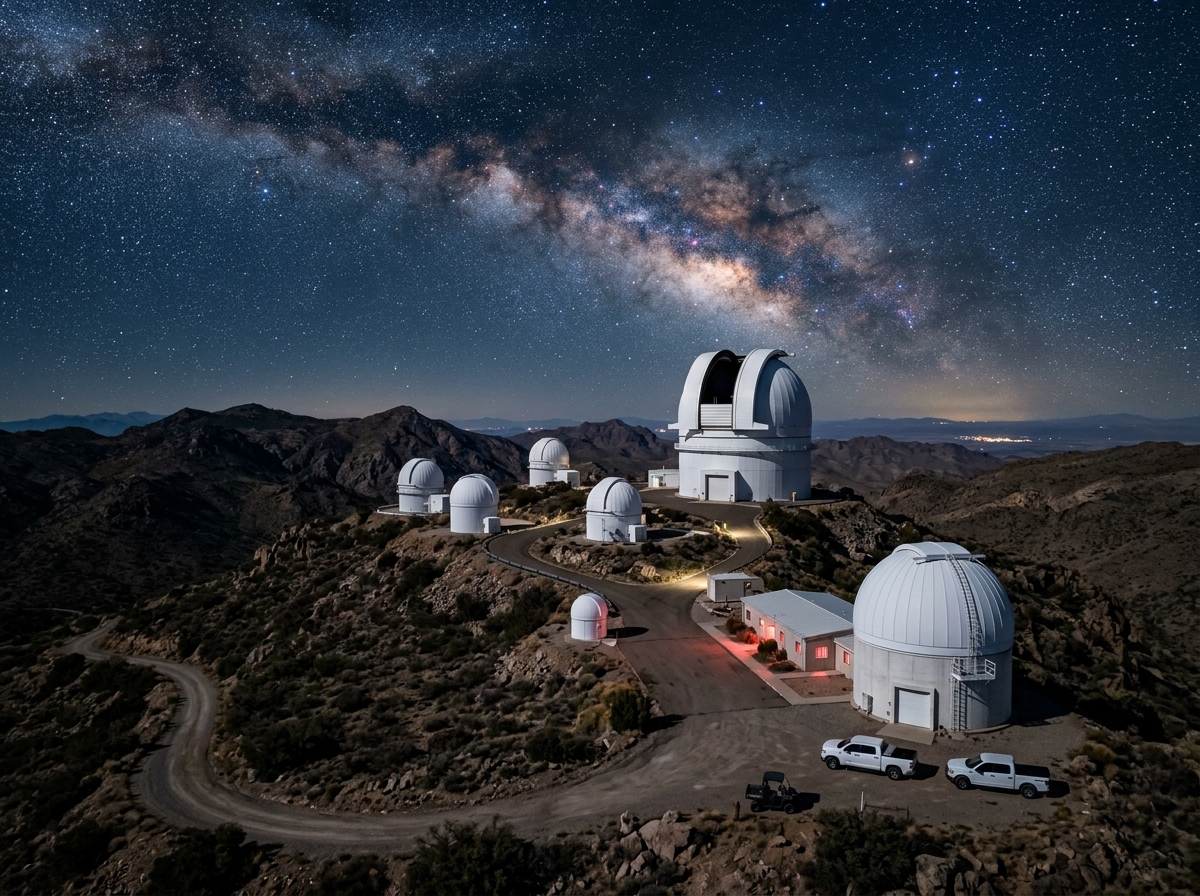
When we talk about a remote star photography setup, we aren’t just talking about standing ten feet away with a Bluetooth remote. We are talking about “robotic” astronomy. This involves a telescope located in a high-altitude, ultra-dark location—often thousands of miles away—that we control via the internet.
In a traditional backyard setup, you are the mechanic, the navigator, and the photographer. You have to deal with “local” problems: the neighbor’s porch light, the humidity of the valley, or that one tree that always blocks the Orion Nebula right when it gets to the meridian.
Remote setups live in places specifically chosen for their “seeing” quality and atmospheric transparency. “Seeing” refers to how much the atmosphere twinkles or distorts the light. In professional remote facilities, seeing often averages 1 to 1.5 arc-seconds, and sometimes even sub-arcsecond. For comparison, a typical suburban backyard might have seeing of 3 or 4 arc-seconds, which makes stars look like fuzzy blobs rather than pinpoints.
The Bortle Scale and Clear Nights
The Bortle scale measures the darkness of the night sky from 1 (pristine) to 9 (inner-city). Most remote observatories are located in Bortle 1 or 2 zones. According to research, premier remote facilities offer over 260 clear nights a year, while sites in Chile can boast up to 300 nights of perfectly transparent skies. If you live in a place where it rains every time you buy a new piece of gear (the “astronomer’s curse”), moving your imaging to a remote desert is a total game-changer.
Benefits of a Remote Star Photography Setup
The most obvious benefit is the quality of the data. Because these sites are at high elevations (often 5,000 to 9,000 feet), there is less air between the telescope and the stars. This leads to higher contrast and more detail in your nebulae.
- Access to the Southern Hemisphere: From the Northern Hemisphere, we can never see the Carina Nebula or the Large Magellanic Cloud. Remote setups in Chile or Australia open up a whole new half of the universe.
- Time Efficiency: Instead of spending two hours setting up and three hours tearing down, you simply log in, click “Start,” and go to sleep. The system handles the meridian flips and the roof closure.
- Equipment Access: Many services let you “rent” time on $50,000 Planewave telescopes or massive 16-inch Ritchey-Chrétien reflectors. You get professional-grade data for the price of a streaming subscription.
Who Should Use a Remote Star Photography Setup?
We believe remote imaging isn’t just for the pros. It’s actually a fantastic tool for beginners who want to learn how to process images without the frustration of troubleshooting hardware in the dark.
Educators use these setups to bring real-time space images into the classroom, and experienced imagers use them to maximize their “clear sky time” during the work week. Even scientific researchers use remote hosting for minor planet searches or monitoring supernovae, as the consistency of 275+ nights a year allows for data collection that backyard setups simply can’t match.
Choosing Your Path: Accessing Remote Astrophotography
There are three main ways to get your hands on remote data. Each has its own cost structure and “learning curve.”
| Model | Best For | Typical Cost | Maintenance |
|---|---|---|---|
| Data Subscriptions | Beginners / Busy People | $15–$50/mo | None |
| Rented Telescope Time | Specific Targets / High-End Gear | $50–$100/hr | None |
| Hosting Your Own Gear | Serious Enthusiasts | $200–$700/mo | You ship, they fix |
Considerations for Remote Astrophotography Providers
When choosing a provider, we recommend looking at the geographic location first. If you want galaxies, the high deserts of the Southwest US are king. If you want the most exotic nebulae, look toward Chile.
Infrastructure is also key. Does the facility have a redundant internet connection (like fiber plus a Starlink backup)? Do they have on-site technicians who can fix a loose cable? Leading remote facilities are popular because they provide 24/7 support and security for the gear.
For those interested in the technical side of building their own rig to send to these sites, checking out a guide on Setting Up a Remote Astrophotography Rig is an essential first step.
Essential Hardware and Software for Remote Control
If you decide to host your own remote star photography setup, your equipment needs to be “robotic-ready.” This means every single component must be controllable by a computer. You can’t be there to manually turn a focus knob or swap a filter.
Robotic Mounts and Sensors
The mount is the most critical piece. It needs to have absolute encoders or a very reliable “home” position so that if the power goes out, it knows exactly where it is pointing when it reboots. We often see mounts from 10Micron, Software Bisque, or high-end Sky-Watcher models in these facilities.
For cameras, cooled CMOS sensors are the standard. Because you are imaging remotely, you want a camera with an integrated cooling system to keep thermal noise low during those long desert summer nights.
Essential Remote Components:
- Electronic Focuser: Must be high-precision to handle temperature shifts throughout the night.
- Filter Wheel: Allows you to switch between LRGB and Narrowband filters automatically.
- Flat Panel: Some setups use a robotic “flip-flat” cover that acts as a light source for calibration frames.
- Power Switch: A web-enabled power distribution unit (PDU) is vital. If your camera freezes, you need to be able to “cycle the power” from your phone.
Software Tools for a Remote Star Photography Setup
Software is the “brain” of the operation. Most remote imagers use NINA (Nighttime Imaging ‘N’ Astronomy) or Sequence Generator Pro. These programs coordinate the mount, camera, and focuser.
To actually “see” the computer at the observatory, we use Chrome Remote Desktop, TeamViewer, or RustDesk. These apps let you see the remote desktop as if you were sitting right in front of it. For users of the ZWO ASIAIR system, remote access is possible but usually requires a VPN (Virtual Private Network) to “trick” the app into thinking your phone and the ASIAIR are on the same WiFi network.
Power and Connectivity Requirements
You can’t run a remote observatory on a spotty 2Mbps connection. Most facilities require at least 10Mbps upload/download speeds with low latency (under 50ms).
Power reliability is managed through a UPS (Uninterruptible Power Supply). This gives the system enough time to safely “park” the telescope and close the roof if the main power grid fails. We also recommend a “watchdog” timer that can automatically reboot the PC if it stops responding to pings.
Step-by-Step: From Image Request to Final Processing
If you are using a professional portal service, the process is streamlined. You don’t have to worry about the hardware; you just worry about the art.
- Log in to the Portal: Create an account and select a telescope based on the “field of view” you need.
- Target Selection: Enter the name of the object (e.g., M31 or NGC 7000). The system uses “plate solving” to perfectly center the target.
- Set Exposure Parameters: Choose your filters and exposure times. For a bright galaxy, you might do 300-second exposures in Red, Green, and Blue.
- Wait for the Clear Sky: The system will put your request in a queue. When the weather is good and the target is high in the sky, it clicks away.
- Download Your Data: Once finished, you’ll receive a link to download your FITS files.
Managing Challenges and Technical Issues
Even in professional facilities, things go wrong. Cable snags are the nightmare of the remote imager. We always recommend testing your setup at home for at least a month before shipping it to a remote site.
Weather monitoring is usually handled by the facility. They have “cloud sensors” and “rain sensors” that automatically trigger a roof closure. However, you should still keep an eye on the local forecast to ensure your imaging plan makes sense for the conditions.
Processing Your Remote Data
The data you receive is “raw.” It will look mostly black and full of strange artifacts until you process it.
- FITS Format: This is the gold standard for astronomy. It contains not just the image, but “metadata” like the temperature of the sensor and the exact coordinates of the sky.
- Stacking: We use software like DeepSkyStacker or PixInsight to combine dozens of exposures into one. This increases the “signal-to-noise ratio,” making the faint details of the nebula pop out.
- Calibration: You must use Dark, Flat, and Bias frames to remove sensor noise and dust spots. Most remote services provide these for you, which is a massive time-saver.
Frequently Asked Questions about Remote Imaging
Is remote astrophotography more expensive than a backyard setup?
It depends on how you value your time. While a $200/month hosting fee sounds high, consider that you are getting 3x the clear nights and 10x the data quality. You also save on gas, travel, and the “wear and tear” of hauling gear. For many, the cost-per-clear-hour is actually lower with a remote setup.
What is the FITS file format and why is it used?
FITS stands for Flexible Image Transport System. It’s used because it’s “non-destructive.” Unlike a JPEG, it doesn’t compress the data. It also allows for multidimensional arrays, which is a fancy way of saying it can store a lot of scientific data in one file.
Can I use a smart telescope remotely?
Yes! We have seen many users ship “smart telescopes” like the Seestar S50 to remote observatories. Since these are already controlled by an app, you just need a small “host” computer (like a MacMini or a PC) at the site to relay the commands via a remote desktop app.
Conclusion
The era of shivering in a dark field while fighting with a laptop is coming to an end. A remote star photography setup represents the future of this hobby – a way to democratize access to the most beautiful parts of our universe.
Whether you are imaging from a balcony in a bright city or accessing a Bortle 1 site in the Atacama Desert, the goal is the same: to connect with the cosmos. By moving your trigger finger from the camera body to a remote mouse click, you open up a world of professional-grade imaging that was once reserved for university observatories.
The stars are waiting, and now, you do not even have to put on a coat to see them.
