
Essential Gear and Planning for Success
To succeed with this star trails tutorial, you need a specific toolkit. While you don’t need the most expensive gear on the market, stability and manual control are non-negotiable.
The Essential Gear List
- A Camera with Manual Mode: A full-frame sensor is ideal because it collects more light and produces less noise, but modern crop-sensor cameras work remarkably well too.
- A Wide-Angle Lens: We recommend something between 14mm and 24mm. An aperture of f/2.8 is the “gold standard” for letting in enough starlight, though f/4 or even f/5.6 can work if you adjust your ISO.
- A Sturdy Tripod: This is the most critical piece of equipment. Even a tiny vibration from the wind can ruin a two-hour shoot. A carbon fiber tripod is preferred for its vibration-dampening properties.
- An Intervalometer: This device allows you to program a sequence of shots (e.g., 100 shots at 30 seconds each). Many modern cameras have this built-in, but an external plug-in remote is often more reliable and easier to use in the dark.
- Extra Batteries and a Lens Heater: Long exposures drain batteries quickly, especially in the cold. A lens heater (an inexpensive USB-powered strip) prevents dew from forming on your glass—a common shoot-killer.

Planning Your Shoot
You can’t just walk outside and hope for the best. Success in a star trails tutorial depends on three environmental factors:
- Moon Phase: A New Moon is best for seeing the most stars. However, a crescent moon (25-50% illumination) is actually a secret weapon; it provides just enough light to illuminate your foreground landscape without washing out the stars. Avoid the Full Moon, as it makes the sky too bright for faint star trails.
- Light Pollution: Use a light pollution map to find “dark sky” areas. While you can shoot in cities (more on that later), a dark location allows for much cleaner, more colorful trails.
- Weather and Sky Charts: Check apps like Clear Dark Sky or Windy. You need a night with minimal cloud cover. Interestingly, 10-20% cloud cover can sometimes add a sense of movement and drama to your final stack, but a completely overcast sky is a no-go.
Mastering Camera Settings in This Star Trails Tutorial
When it comes to capturing the rotation of the Earth, you have two choices: one very long exposure (30+ minutes) or stacking multiple shorter exposures (30-60 seconds).
We strongly recommend the stacking method. Why? A single 30-minute exposure generates massive amounts of thermal noise as your sensor heats up, creating ugly purple glows and “hot pixels.” Stacking keeps the sensor cooler and gives you the flexibility to remove a single frame if a stray car headlight or a bright plane ruins it.
| Feature | Single Long Exposure | Stacking Method (Recommended) |
|---|---|---|
| Noise Level | Very High (Thermal Noise) | Low (Sensor stays cooler) |
| Flexibility | Zero (One mistake ruins the shot) | High (Can delete bad frames) |
| Post-Processing | Minimal | Requires Stacking Software |
| Battery Life | High Drain | Moderate Drain |
How to Focus Your Lens for a Star Trails Tutorial
Focusing in the dark is the hardest part for beginners. Your camera’s autofocus will fail 99% of the time in the pitch black.
The Live View Method:
- Switch your lens to Manual Focus (MF).
- Turn on Live View on your LCD screen.
- Find the brightest star in the sky (or a distant light on the horizon).
- Use the digital zoom on your screen (not the lens zoom) to magnify that star by 10x.
- Slowly turn the focus ring until the star becomes a tiny, sharp pinprick of light. If it looks like a soft “bokeh” ball, you aren’t there yet.
Pro Tip: If you want to be extra safe, focus on an object about 50 feet away during the day, verify it is sharp, and then secure the focus ring with a piece of gaffer tape so it doesn’t budge during the night.
Setting the Intervalometer for Seamless Trails
To avoid “gaps” in your star trails, the timing must be precise. You want the camera to finish one shot and immediately start the next.
- Shutter Speed: 30 seconds is the standard.
- Interval: Set this to 1 second. (Note: On some cameras, if your shutter is 30s, you must set the interval to 31s or 32s to account for the “processing” time).
- Number of Shots: Aim for at least 80–100 exposures. At 30 seconds each, 100 shots will give you about 50 minutes of trail data.
- White Balance: Set this manually to Kelvin (approx 4000K). Do not use Auto White Balance, or the color of your sky might shift from frame to frame, making the final stack look flickery.
- Noise Reduction: Ensure “Long Exposure Noise Reduction” is turned OFF. If it’s on, the camera will take another 30-second “dark frame” after every shot, creating massive gaps in your trails.
The Stacking Method: Step-by-Step Execution
Once your gear is set and your focus is locked, it’s time to start the sequence.
As you sit by your camera (perhaps with a thermos of coffee), your sensor will be hard at work. Even with the stacking method, sensors can develop “hot pixels”—tiny red or blue dots caused by heat. To combat this, take 2 or 3 “Dark Frames” at the very end of your shoot. Simply put the lens cap on and take a few more 30-second exposures with the exact same settings. Stacking software uses these to “subtract” the noise from your final image.
Don’t forget the foreground. A photo of just stars is a science experiment; a photo of stars over an old barn, a jagged mountain, or a lone tree is art. You can use “light painting” (gently waving a flashlight over the foreground for 2-3 seconds during one of your exposures) to bring out detail in the landscape.
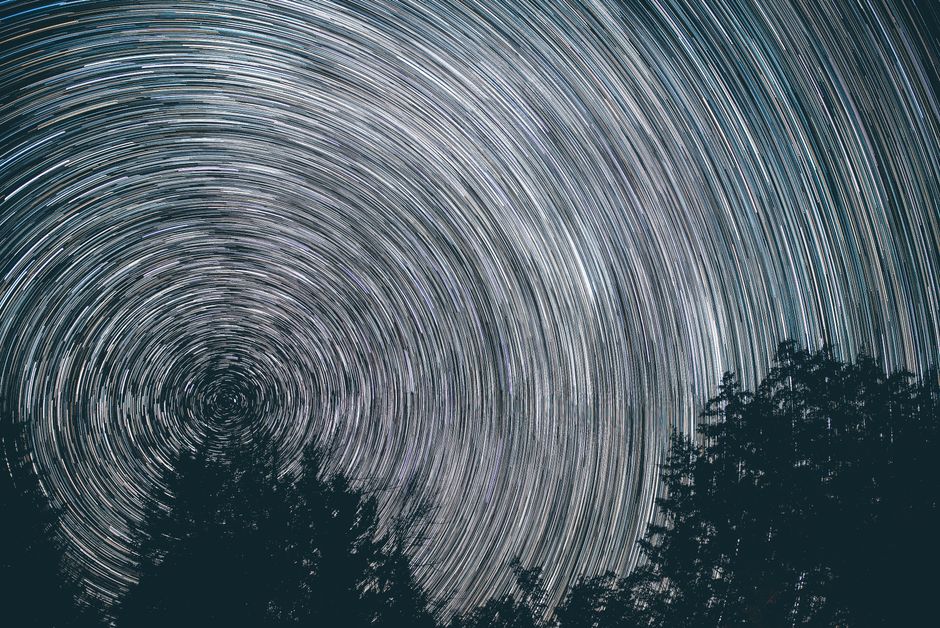
Moonlight reflects about 12% of the sun’s light. This “soft” light is perfect for illuminating landscapes naturally. If you want to dive deeper into how to polish these images, check out our guide on star trail image editing.
Post-Processing and Software Recommendations
After a night in the field, you’ll have a memory card full of RAW files.
- Batch Edit in Lightroom: Import all your photos. Edit the first one (adjust exposure, contrast, and white balance). Select all images and click “Sync” so every photo looks identical.
- Export as JPEGs or TIFFs: High-quality JPEGs are usually sufficient and much faster to process.
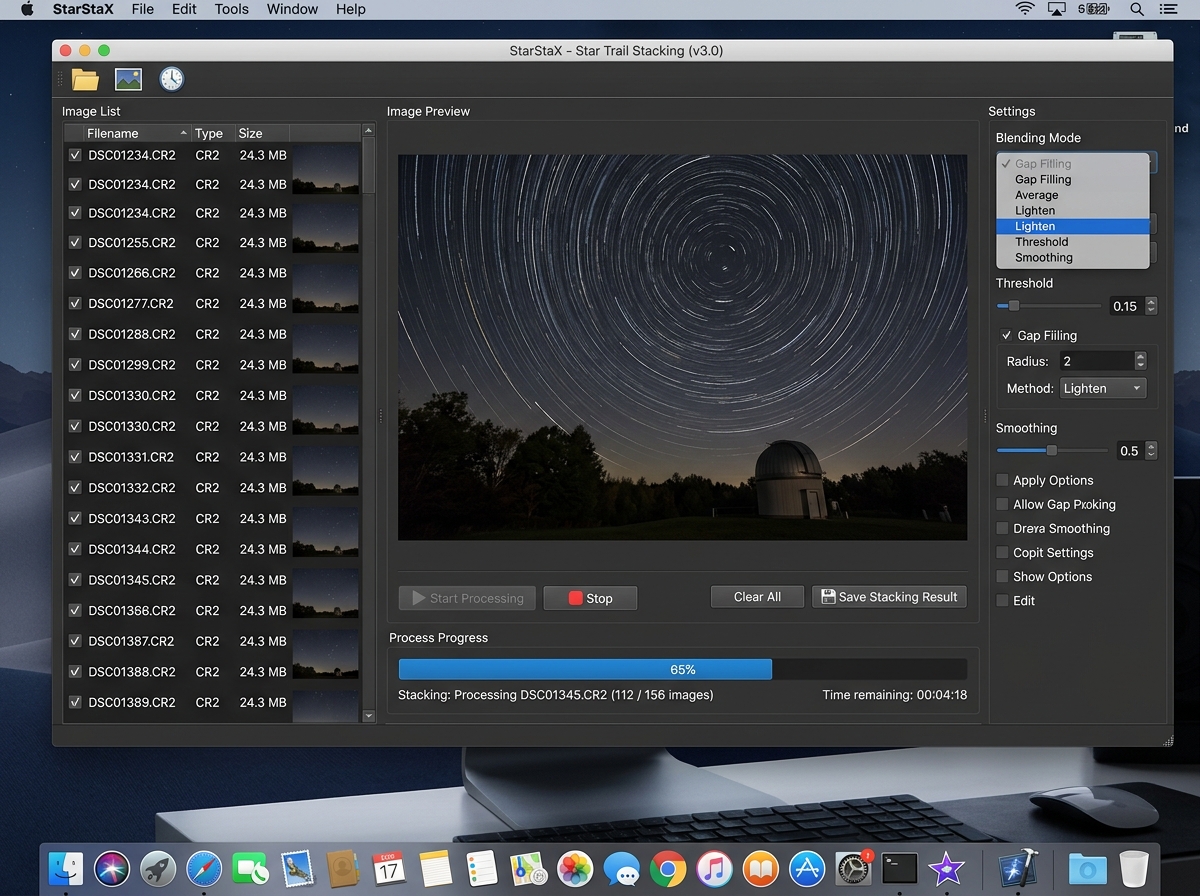
- Use Stacking Software: We recommend StarStaX (Free for Mac/Windows) or Sequator.
- Load your images into the software.
- Select “Lighten” as the blending mode. This tells the software to look at every pixel and only keep the brightest one. Since the stars move and the sky stays dark, only the stars get “added” together.
- Use “Gap Filling” mode if you see tiny breaks in your lines.
Advanced Tips for This Star Trails Tutorial
- Urban Star Trails: You can shoot star trails in cities! Because of the light pollution, you must use shorter exposures (5–10 seconds) and lower ISO. You might need to stack 1,000+ images, but the result of stars arcing over a skyscraper is stunning.
- Vortex Effects: By slightly zooming your lens in or out during the sequence, you can create a “vortex” or “warp speed” effect.
- Know Your Direction: Pointing North (in the Northern Hemisphere) toward Polaris creates perfect circles. Pointing East or West creates straight lines that curve away from each other (celestial equator).
Frequently Asked Questions about Star Trails
How long does it take to capture a full circle of star trails?
To get a literal 360-degree circle, it would take 24 hours (which is impossible due to the sun!). However, to get a “full-looking” circle that fills the frame, we recommend shooting for at least 2 to 4 hours. Since the sky rotates 15 degrees per hour, a two-hour shoot gives you a 30-degree arc, which is very prominent.
Why are there gaps in my star trail images?
Gaps usually happen for three reasons:
- Long Exposure Noise Reduction was left on (the camera pauses between shots).
- Slow Memory Card: The camera is still “writing” the data when the next shot is supposed to start. Use a high-speed (Class 10/UHS-3) card.
- Interval is too long: Keep your interval at 1 second.
Can I shoot star trails in a light-polluted city?
Yes! In fact, star trails are more “forgiving” of light pollution than the Milky Way. Use a lower ISO (400-800) and shorter shutter speeds (5-10 seconds) to prevent the city glow from blowing out the image. You will just need to take many more photos to get the same trail length.
Conclusion
At Pratos Delícia, we believe that the night sky is the ultimate canvas for any photographer. Capturing star trails is a lesson in patience and persistence, but the reward is a photograph that captures the very heartbeat of our rotating planet.
Don’t be afraid to experiment with different foregrounds, moon phases, and focal lengths. The “perfect” shot is often the result of several “failed” nights where you learned exactly what not to do. Now that you’ve mastered the capture, you can access more photography guides to continue your journey into creative imaging. Happy shooting!
