
What Are Long Exposure Traffic Trails (And How Do You Capture Them)?
Long exposure traffic trails are streaks of colored light created when a camera’s shutter stays open while vehicles move through the frame at night.
Here’s the quick version of how it works:
- Red streaks = taillights from cars driving away from you
- White streaks = headlights from cars driving toward you
- Longer shutter = longer trails
- The car itself becomes invisible — only the light it leaves behind shows up
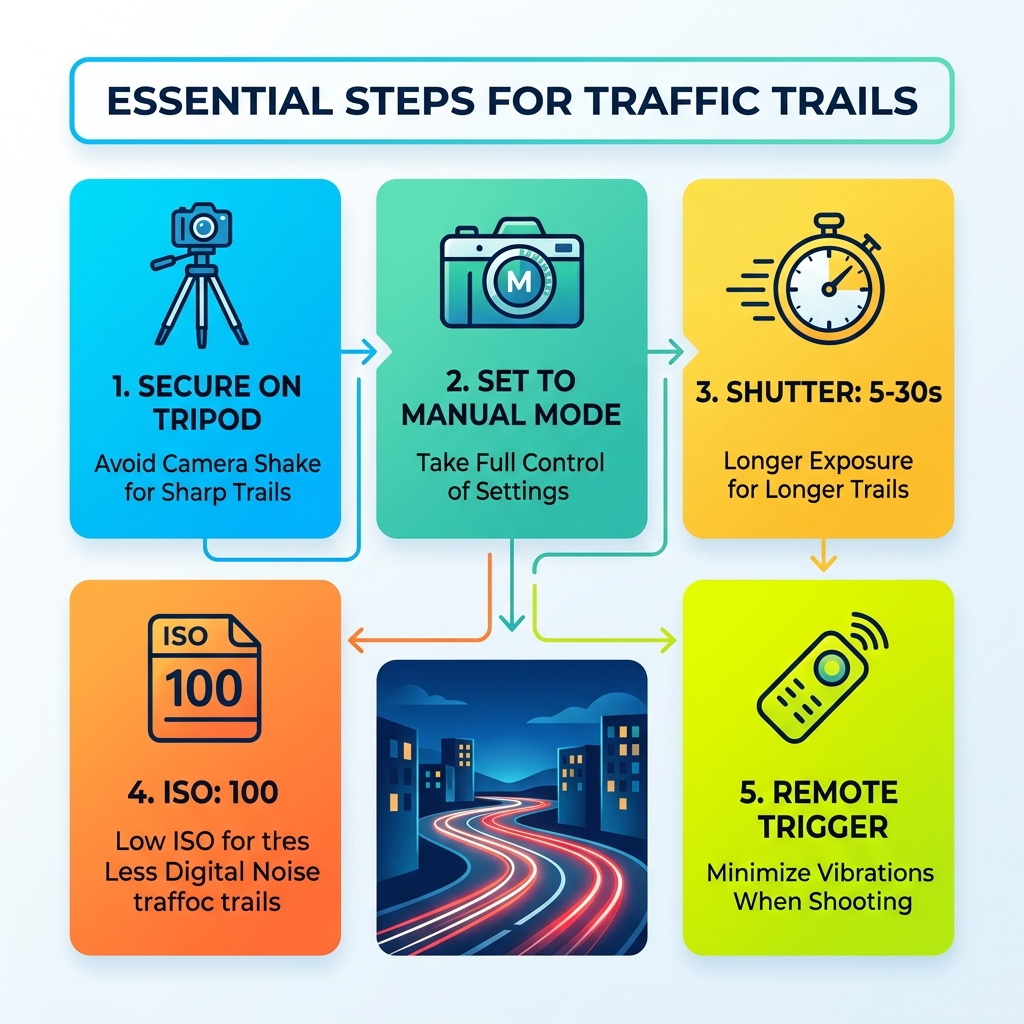
The essential steps to capture traffic trails:
- Mount your camera on a sturdy tripod
- Set your camera to Manual mode
- Use a shutter speed between 5 and 30 seconds
- Set ISO to 100 and aperture to f/8–f/16
- Use a remote shutter release to avoid camera shake
- Wait for traffic, then shoot
That’s the core of it. No expensive gear required. No advanced skills needed to start.
What makes this technique so compelling is what the camera sees that your eyes never can. A busy intersection becomes a river of glowing color. A winding highway becomes a ribbon of pure light. The chaos of traffic transforms into something almost painterly.
You’re not just taking a photo — you’re recording time itself.
The best part? This is one of the most beginner-friendly night photography techniques out there. If you can set a few manual controls and press a button, you can create images that look genuinely stunning.
This guide walks you through every step — gear, settings, locations, composition, and editing — so you can go from your first test shot to a frame-worthy result.
Essential Gear for Capturing Long Exposure Traffic Trails
When we head out to capture the night, we don’t need a mountain of equipment, but the gear we do bring must be reliable. Because we are dealing with long shutter speeds, even the slightest vibration can ruin a shot.
The Camera: DSLR or Mirrorless
While high-end cameras are great, any DSLR or mirrorless system with a “Manual Mode” and “Bulb Mode” will work perfectly. You want a camera that allows you to control the shutter speed, aperture, and ISO independently. If you are just starting, even an entry-level camera like a Canon Rebel or a Nikon D3000 series is more than enough to capture professional-looking long exposure traffic trails.
The Sturdy Tripod
This is the most important piece of gear. We cannot stress this enough: you cannot hold the camera by hand for a 10-second exposure. Even if you think you have steady hands, the heartbeat in your fingertips will cause blur. Look for a tripod that is heavy enough to withstand a bit of wind but light enough that you’ll actually carry it to your location.
The Lens: Wide-Angle is King
In urban environments, we often want to capture the scale of the city. A wide-angle lens (around 16mm to 35mm on a full-frame camera) is ideal. This allows us to include the road, the skyscrapers, and the sky all in one frame. Wide lenses also have a deeper depth of field, which helps keep everything from the foreground trails to the distant buildings in sharp focus.
Remote Shutter Release or Cable Release
When you press the shutter button with your finger, you move the camera slightly. To avoid this, we use a remote shutter release or a mechanical cable release. If you don’t have one, don’t worry! You can use your camera’s built-in 2-second or 10-second self-timer. This gives the camera time to stop shaking after you press the button before it actually starts the exposure.
Smartphone Alternatives
Believe it or not, you don’t always need a bulky camera. Modern smartphones have become incredibly capable. If you’re looking to lighten your load, check out our guide on capture-the-night-long-exposure-smartphone-photography to see how mobile sensors handle low light.
Extra Batteries and Warm Clothes
Long exposures drain batteries faster than standard snapshots, especially in the cold. We always pack at least one spare. And since you’ll be standing still for long periods on overpasses or street corners, dress warmer than you think you need to!
Mastering Camera Settings for Light Trails
Getting the settings right is where the magic happens. We want to balance the light so that the traffic trails are bright and continuous, but the buildings and streetlights aren’t “blown out” (too bright).
We always recommend shooting in Manual Mode. This gives us total control over the “Exposure Triangle.”
The Recommended Starting Point:
- Mode: Manual (M)
- ISO: 100 or 200 (to keep the image clean and noise-free)
- Aperture: f/8 to f/11 (the “sweet spot” for lens sharpness)
- Shutter Speed: 10–20 seconds (depending on traffic speed)
- Format: RAW (essential for post-processing)
[TABLE] Shutter Speed Guide for Different Traffic Flows
| Traffic Scenario | Recommended Shutter Speed | Goal |
|---|---|---|
| Fast Highway Traffic | 5 – 10 Seconds | Capture long, sleek streaks |
| Slow City Intersections | 15 – 30 Seconds | Allow cars to move through the whole frame |
| Sparse Country Roads | 30+ Seconds (Bulb Mode) | Wait for a single car to pass completely |
| Multiple Light Cycles | 45 – 60 Seconds | Create “dense” rivers of light |
Dialing in Shutter Speed for Long Exposure Traffic Trails
The shutter speed is your most important creative tool. If the shutter is too short (e.g., 2 seconds), your trails will look like “ghost cars” or broken fragments. If it’s too long, the ambient light from the city might turn your sky into a muddy orange.
We generally aim for a duration that allows a vehicle to travel from one side of our composition to the other. On a fast-moving highway, this might only take 8 seconds. At a red light in the city, you might need 25 seconds to capture the cars accelerating once the light turns green.
For those using mobile devices, there are specific techniques to mimic these long shutter speeds. You can find more details in our long-exposure-tips-for-smartphone-night-photos guide.
Focusing and White Balance for Long Exposure Traffic Trails
Focusing at Night Autofocus often struggles in the dark. It will “hunt” back and forth, unable to find a sharp edge. We prefer to use Manual Focus.
- Switch your lens to ‘M’.
- Use the “Live View” screen on the back of your camera.
- Zoom in digitally on a distant streetlamp or a bright sign.
- Turn the focus ring until that light is a tiny, sharp point.
- Once set, don’t touch it!
White Balance City lights come in many colors—orange sodium lamps, blue LEDs, and white halogens. While “Auto White Balance” (AWB) usually does a decent job, we prefer to shoot in RAW so we can adjust the “temperature” later. If you want that classic “cool” blue city look, try the “Tungsten” or “Incandescent” setting.
If you are shooting on a phone, certain apps can help you lock these settings. Check out our review of the top-mobile-camera-apps-for-long-exposure-shots-2 for the best tools to use.
Top Locations and Timing for Success
You could have the best settings in the world, but if you’re in a boring spot, you’ll get a boring photo. Finding the right location is half the battle.
The Magic of the Blue Hour
While you can shoot long exposure traffic trails in the middle of the night, the absolute best time is the Blue Hour. This is the 20-40 minute window after the sun goes down but before the sky turns pitch black.
During Blue Hour, the sky has a beautiful deep blue hue that provides a perfect contrast to the warm orange and red light trails. It also allows you to capture detail in the buildings that would otherwise be lost in total darkness.
Best Vantage Points
- Highway Overpasses: These are the “bread and butter” of traffic photography. They offer a safe, elevated view of multiple lanes. Look for overpasses with “S-curves” in the road below to create more dynamic lines.
- Bridges: Bridges often provide a clear view of both traffic and water reflections.
- Urban Intersections: Shooting from a sidewalk at a busy 4-way stop allows you to capture trails turning corners, which adds a sense of chaos and energy.
- Sinclair Canyon and Natural Passes: Don’t limit yourself to the city! Places like Sinclair Canyon in Kootenay National Park offer stunning opportunities to contrast organic rock walls with the artificial glow of car lights.

Safety First
We cannot emphasize this enough: Never stand in the road. No photo is worth your life.
- Wear high-visibility clothing if you are near a road.
- Stay behind guardrails on overpasses.
- Be aware of your surroundings, especially when shooting alone at night in the city.
- If you are using your phone to scout or shoot, make sure you have a secure mount. See our list of top-mobile-camera-apps-for-long-exposure-shots for apps that help with low-light navigation and planning.
Composition and Post-Processing Techniques
A great photo of long exposure traffic trails isn’t just about the lights; it’s about how those lights lead the viewer’s eye through the frame.
Use Leading Lines and Diagonals
The light trails themselves are “leading lines.” We try to position ourselves so the trails start in a corner of the frame and lead toward a focal point, like a famous building or the horizon. Diagonals create a sense of movement and speed, whereas horizontal lines can feel more static.
Symmetry and Balance
If you are on a bridge directly over the center of a highway, you can achieve perfect symmetry. The white headlights on the left and red taillights on the right create a balanced, professional look.
Exposure Stacking: The Pro Secret
Sometimes, one single exposure isn’t enough. If traffic is light, your photo might look a bit “empty.” The Fix: Take 5 or 10 photos from the exact same spot without moving the tripod. Later, in software like Adobe Photoshop or Lightroom, you can “stack” these images. By using the “Lighten” blend mode, the software will combine all the light trails from every photo into one single, dense river of light.
Post-Processing Tips
- Saturation: Boost the reds and oranges to make the trails “pop.”
- Highlights and Shadows: Pull down the highlights to recover detail in bright streetlamps. Lift the shadows to see more detail in the architecture.
- Noise Reduction: Even at ISO 100, long exposures can generate “hot pixels” or digital noise. Use a light touch of noise reduction to clean up the sky.
Frequently Asked Questions about Traffic Photography
Why are my light trails too short or broken?
This usually happens because the car didn’t travel through the entire frame while the shutter was open, or there were large gaps between cars. Solution: Increase your shutter speed to 20 or 30 seconds. If traffic is sparse, wait for a large group of cars (like a pack released from a green light) before hitting the shutter.
How do I avoid blurry buildings in my shots?
If the buildings are blurry, something moved. It’s usually one of three things:
- The Tripod: It might be too flimsy for the wind.
- The Ground: If you are on a bridge, the vibrations from passing trucks can shake the entire structure.
- The Shutter: Pressing the button by hand. Use a remote or the self-timer!
Can I shoot light trails during the day?
Yes, but it’s much harder. You will need a Neutral Density (ND) Filter. This is essentially “sunglasses for your lens” that blocks out light, allowing you to use a 10-second shutter speed even in broad daylight. Without an ND filter, a 10-second exposure during the day will result in a completely white, overexposed image.
Conclusion
Mastering long exposure traffic trails is a rite of passage for every photographer. It teaches you the fundamentals of manual control, the importance of stability, and the patience required to wait for the perfect moment. At Pratos Delícia, we believe that photography is about seeing the world in ways others miss. By slowing down your shutter, you reveal a hidden world of energy and motion.
Don’t be afraid to experiment. Go to an overpass, try different shutter speeds, and play with the colors of the city. Every night is a different canvas.
Ready to take your skills to the next level? Explore our full photography guides for more tips on capturing the world around you, from mobile masterpieces to professional nightscapes. Happy shooting!
