
Why Low Light Photography Settings Are So Hard to Get Right
Low light photography settings are the combination of aperture, shutter speed, and ISO that let your camera capture sharp, well-exposed images when light is scarce. Here’s a quick-reference guide to the core settings:
| Setting | Recommended Starting Point | Trade-off |
|---|---|---|
| Aperture | f/1.8 – f/2.8 (as wide as possible) | Shallower depth of field |
| Shutter Speed | 1/50s handheld; longer on tripod | Motion blur at slow speeds |
| ISO | 800 – 3200 (raise as needed) | More digital noise at high values |
| File Format | RAW | Larger files, more editing flexibility |
| Shooting Mode | Manual or Aperture Priority | Requires more hands-on control |
Every camera struggles in the dark. It doesn’t matter if you have a budget mirrorless or a high-end DSLR — when light is scarce, the sensor has less to work with.
The result? Photos that come out blurry, grainy, or just plain dark.
As British photojournalist Donald McCullin once said: “There is no such thing as bad light, just misunderstood light.” That’s the right mindset here. Low light isn’t a dead end — it’s a puzzle with a clear solution once you understand the three levers your camera gives you.
The tricky part is that those three levers — aperture, shutter speed, and ISO — all affect each other. Pull one in the wrong direction and you create a new problem. Open your aperture wide for more light, and your depth of field gets razor thin. Slow your shutter speed down, and moving subjects blur. Crank up the ISO, and grain invades every shadow.
That’s the core challenge this guide tackles.
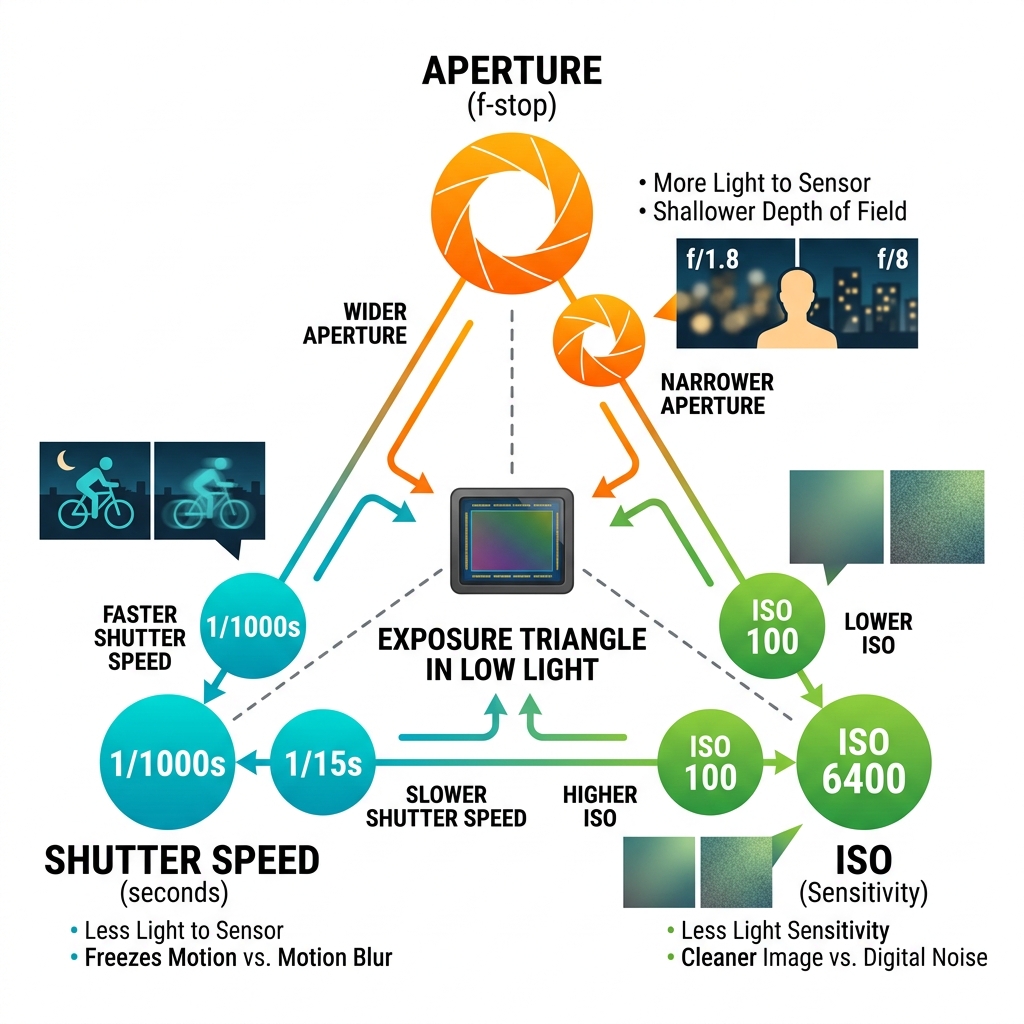
The Exposure Triangle for Low Light Photography Settings
To master low light photography settings, we must first understand the Exposure Triangle. Think of your camera sensor like a bucket and light like water. To fill the bucket, you can open the tap wider (Aperture), leave it running longer (Shutter Speed), or use a more absorbent sponge inside the bucket (ISO). For a deeper technical overview of how exposure works, Adobe also offers a useful primer on camera exposure settings.
In dark environments, the “tap” is barely dripping. We have to make compromises to get a usable image. Mastering low light photography settings often requires us to push all three settings to their limits.
Maximizing Aperture with Fast Lenses
The aperture is the opening in your lens. A “wide” aperture (represented by a low f-stop number like f/1.8 or f/2.8) lets in a massive amount of light compared to a “narrow” one (like f/11).
Lenses with these wide maximum apertures are called “fast lenses” because they allow for faster shutter speeds. If we are shooting in a dimly lit room, switching from an f/5.6 kit lens to an f/1.8 prime lens is like opening a window in a dark basement.
The trade-off is depth of field. At f/1.8, your focus area is incredibly thin. If you’re taking a portrait, the eyes might be sharp, but the tip of the nose could be blurry. However, this also creates beautiful “bokeh”-that creamy, blurred background that makes subjects pop. For most low light photography settings, we recommend starting with the widest aperture your lens allows.
Balancing Shutter Speed and Motion
Shutter speed dictates how long your sensor is “looking” at the scene. In the dark, we want the shutter open as long as possible to soak up light. But there’s a catch: movement.
If we hold the camera by hand, our natural body tremors cause “camera shake.” A common guideline is the reciprocal rule: your shutter speed should be at least 1 divided by your focal length. For a 50mm lens, you shouldn’t go slower than 1/50th of a second handheld. For those using mobile devices, long-exposure-tips-for-smartphone-night-photos can help manage these handheld limits.
If your subject is moving-like a dancer or a pet-you’ll need even faster speeds (1/200s or more) to freeze that action, which forces you to rely more on ISO and aperture.
Managing ISO and Digital Noise
ISO is your sensor’s sensitivity to light. Increasing the ISO “amplifies” the light signal, making the image brighter without changing the aperture or shutter speed. It’s a lifesaver, but it comes with a price: digital noise.
Noise looks like grain or multicolored speckles, especially in the dark shadows of your photo. Every camera has a “native ISO” (usually 100) where the image is cleanest. As we push to ISO 3200 or 6400, the grain becomes noticeable. However, modern mirrorless cameras are incredible at handling high ISOs. It is always better to have a sharp, grainy photo than a clean, blurry one. You can fix grain in editing, but you can’t fix a blurry mess!
Choosing the Best Shooting Mode for Low Light Photography Settings
We strongly suggest moving away from “Auto” mode. In Auto, the camera often makes poor choices, like popping up a harsh flash or choosing a shutter speed that is too slow.
- Manual Mode (M): This gives us total control. We set the aperture wide, choose a safe shutter speed, and then adjust ISO until the light meter hits zero.
- Aperture Priority (A or Av): We set the widest aperture and a specific ISO, and let the camera pick the shutter speed. This is great for changing light, but keep an eye on that shutter speed to ensure it doesn’t drop too low.
- Auto ISO with Limits: Many pros set their Shutter and Aperture manually but let the ISO float automatically within a range (e.g., 100 to 6400). This ensures we get the shot while preventing the camera from choosing an ISO that is “too noisy.”
Essential Gear and Stabilization for Dark Environments
When the sun goes down, our gear becomes our best friend. While skill matters most, certain tools make low light photography settings much easier to manage.

Full-frame sensors are the gold standard for low light because their larger pixels can capture more light than smaller APS-C or smartphone sensors. Mirrorless cameras also offer a massive advantage: what you see in the electronic viewfinder is exactly how the exposure will look, taking the guesswork out of the dark.
The Role of Image Stabilization
Image stabilization comes in two main forms: In-Body Image Stabilization (IBIS) and Optical Stabilization (found in the lens). These systems use tiny motors to counteract your hand movements.
With a good stabilization system, we can often shoot at shutter speeds as slow as 1/10th or even 1/2 of a second handheld. This allows us to keep our ISO lower, resulting in cleaner images. For smartphone users, capture-the-night-long-exposure-smartphone-photography explains how mobile stabilization works to achieve similar results.
Using Tripods and Remote Shutter Releases
If we want the absolute best quality, we use a tripod. A tripod is essentially a “cheat code” for low light photography settings. By removing camera shake entirely, we can leave the shutter open for 30 seconds or more. This lets us use a low ISO (100) and a narrow aperture (f/11) for maximum sharpness and depth of field.
When using a tripod, even the act of pressing the shutter button can cause a tiny vibration. We recommend using a remote shutter release or the camera’s built-in 2-second self-timer to ensure the camera is perfectly still when the photo is taken. It is also a best practice to turn off image stabilization when on a tripod, as the system might actually create blur by “searching” for movement that isn’t there.
Advanced Techniques for Sharp Low Light Photography Settings
Getting the exposure right is only half the battle. In the dark, cameras often struggle to find focus, and colors can look “off” due to artificial streetlights or indoor bulbs.
Mastering Focus for Low Light Photography Settings
Have you ever heard your lens “hunting”—that zipping sound as it moves back and forth without locking on? This happens because autofocus systems need contrast and light to work.
To fix this:
- Use the Center Focus Point: The center point on most cameras is the most sensitive and accurate in the dark.
- AF Assist Lamp: Many cameras have a small red or white light that shines on the subject to help the lens “see.”
- Manual Focus with Focus Peaking: If autofocus fails, switch to manual. Use “Focus Peaking” (which highlights sharp edges in color) or zoom in on your screen (Live View) to ensure the eyes or details are tack-sharp.
- Back-Button Focus: This separates the focusing action from the shutter button, preventing the camera from trying to re-focus (and potentially missing) right when you want to take the shot.
Creative White Balance and Lighting
Auto White Balance (AWB) often gets confused by orange streetlights or blue twilight. We can take control by selecting presets like “Tungsten” or “Cloudy.” However, the best way to handle this is to shoot in RAW format.
RAW files allow us to change the white balance completely during editing without losing any quality. If you are aiming for the stars, photographing-the-heavens-best-smartphone-settings-for-astrophotography offers great tips on balancing these celestial colors.
We can also get creative with “Light Painting.” By using a long exposure on a tripod, we can “paint” a subject with a flashlight, creating a glowing effect against a dark background.
Post-Processing and Practical Scenarios
Even with the perfect low light photography settings, your “out-of-the-camera” shots might look a bit flat or grainy. This is where post-processing saves the day.
Fixing Noise and Enhancing Details
Modern software has changed the game for low light. AI-powered noise reduction can now strip away grain while keeping the details sharp. When editing, we focus on the “Luminance” slider to smooth out noise and the “Shadows” slider to reveal details hidden in the dark.
If we are shooting a landscape where the sky is bright but the ground is dark, we use exposure bracketing. This means taking three photos: one “normal,” one very dark, and one very bright. We then blend them together in software to get a perfectly exposed image. For mobile editors, adjusting-iso-and-exposure-in-editing-for-clearer-night-sky-images and adjusting-brightness-and-contrast-for-starry-night-images-on-mobile provide excellent workflows for cleaning up night shots.
Frequently Asked Questions about Low Light Photography Settings
Why are my low light photos always blurry?
Blur usually comes from two things: camera shake or subject movement. If the whole photo is blurry, your shutter speed was likely too slow for handheld shooting. If the background is sharp but the person is a smear, you need a faster shutter speed to freeze their movement. Using a tripod or leaning against a wall can help stabilize the camera.
Should I use flash for low light photography?
Flash can be a double-edged sword. Built-in “pop-up” flashes often create a “deer-in-the-headlights” look with harsh shadows. We prefer using ambient light whenever possible. If you must use flash, try “bouncing” an external flash off a white ceiling or wall to soften the light and make it look more natural.
What is the best ISO for night photography?
There is no single “best” number, but we aim for the lowest ISO that allows for a sharp shutter speed. On a tripod, use ISO 100. Handheld at a concert or event, you might need ISO 1600, 3200, or even 6400. Don’t be afraid of high ISO; a grainy shot is always better than a blurry one!
Conclusion
Mastering low light photography settings is one of the most rewarding challenges for any photographer. It forces us to slow down, understand our gear, and look at light in a completely different way. Whether we are capturing the “blue hour” in a city or a cozy candlelit dinner, the principles remain the same: open that aperture, manage your shutter speed, and don’t fear the ISO.
At Pratos Delícia, we believe that every moment is worth capturing beautifully, regardless of the lighting. With a little practice and experimentation, those “shots in the dark” will soon become your most stunning masterpieces. Ready to take your skills further? Master more photography techniques and keep exploring the magic of the night!
