
Why Phone Telescope Adapter Reviews Matter for Beginner Astrophotographers
Reading phone telescope adapter reviews is the fastest way to find the right mount for your smartphone and telescope — a vital tool for anyone starting out in astrophotography — without wasting money on a flimsy one that drops your phone or blurs every shot.
Here are the top-rated smartphone telescope adapters based on real-world reviews:
| Adapter | Best For | Price (approx.) | Key Feature |
|---|---|---|---|
| Celestron NexYZ | Overall best | ~$60 | 3-axis XYZ adjustment |
| Accuview 3-Axis | Premium pick | ~$70 | Includes Bluetooth remote |
| Orion SteadyPix | Universal fit | ~$47 | Fits phones up to 87mm wide |
| Phone Skope | Precision alignment | ~$100 | Model-specific, no fiddling |
| Celestron NexGo | Budget-friendly | Less than NexYZ | Spring-loaded clamp |
There’s one experience almost every beginner shares: you lean over the eyepiece, wiggle your phone around trying to line up the camera, and end up with a blurry smear where the Moon should be.
It’s frustrating. And it’s completely avoidable.
A good smartphone telescope adapter holds your phone steady, centered over the eyepiece, so your camera can actually capture what you’re seeing. The difference between a cheap adapter and a quality one isn’t subtle — one reviewer described how their phone fell out of a budget adapter and shattered the screen protector during a Moon imaging session.
The right adapter changes everything. And this guide breaks down which ones are worth your money.
Key Features to Look for in Phone Telescope Adapter Reviews
When we dive into afocal imaging—which is just a fancy way of saying “taking a picture through the eyepiece”—we quickly realize that not all plastic clamps are created equal. The market is flooded with cheap, generic mounts that often lead to “buyer’s remorse.” To avoid this, we need to focus on the mechanical DNA of the adapter.
First and foremost is build quality. While many top-rated options like the Celestron NexYZ use plastic to keep the weight down (preventing your telescope from tipping over), the quality of that plastic and the tension of the springs matter immensely. You want something that feels like a tool, not a toy.
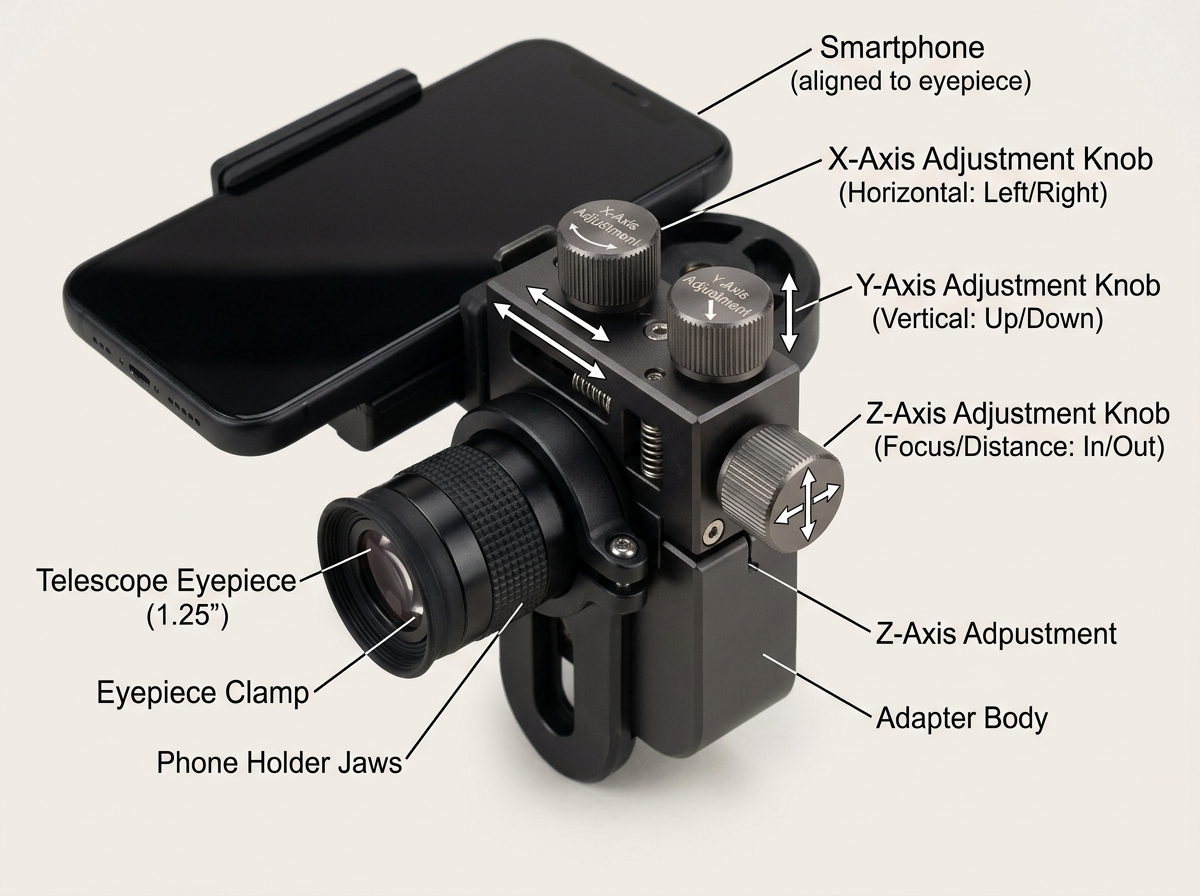
Adjustment axes are the next big hurdle. In many phone telescope adapter reviews, users complain about “fiddly” screws. If an adapter only moves in two directions, you’ll spend half your night sliding the whole unit up and down the eyepiece just to get the distance right. This is why we often look for 3-axis adjustment, which allows for micro-movements without loosening the main clamp.
Finally, consider the phone fit. Modern smartphones are getting larger and heavier. An adapter that worked for an iPhone 5 might not hold an iPhone 15 Pro Max or a Samsung Ultra. We need to look for high-tension spring clamps or padded brackets that can accommodate widths up to 87mm or more. If you’re interested in wider field shots, you might also want to check out smartphone lens adapters for Milky Way photography to see how different mounting systems handle weight and stability.
Understanding Eyepiece Compatibility in Phone Telescope Adapter Reviews
The “business end” of the adapter is the clamp that grabs your telescope’s eyepiece. Most amateur telescopes use 1.25-inch eyepieces, but as you grow in the hobby, you’ll likely encounter 2-inch wide-field eyepieces.
- The 1.25-inch Standard: Almost every adapter on the market fits these. However, look for those with rubber nubs or padding inside the clamp. This prevents the adapter from slipping or scratching your expensive glass.
- The 2-inch Challenge: Premium adapters like the NexYZ are designed to fit diameters from 35mm up to 60mm. This means they can jump from a small spotting scope to a massive 2-inch Newtonian eyepiece without a hitch.
- Small Diameters: Some specialized eyepieces or microscope ports are thinner than 30mm. In these cases, look for adapters that include “sizing rings” to bridge the gap.
Why 3-Axis Adjustment Matters in Phone Telescope Adapter Reviews
If you’ve ever tried to hold a phone to a telescope by hand, you know the struggle of the “blackout.” This happens when your camera lens isn’t perfectly aligned with the exit pupil (the little circle of light coming out of the eyepiece).
This is where 3-axis adjustment (X, Y, and Z) becomes a game-changer.
- X and Y Axes: These move the phone left, right, up, and down to center the lens.
- Z Axis: This is the secret sauce. It moves the phone closer to or further away from the glass. This is crucial for reducing vignetting (that annoying black ring around your photo) and ensuring the entire field of view is illuminated.
Adapters like the Accuview or NexYZ use worm gears for these movements. Instead of loosening a screw and “guessing” the position, you turn a knob and watch the image slowly glide into the perfect center. It’s “slick and easy,” as many reviewers put it, and it saves your night-vision-adjusted eyes from a lot of strain.
Top-Rated Smartphone Adapters for Every Budget
Choosing the right mount often comes down to how much you’re willing to spend for convenience. We’ve categorized the most popular options to help you decide.
Premium 3-Axis Adapters
The Celestron NexYZ is widely considered the gold standard for universal mounts. Priced around $60 (often $50 on sale), it uses a tension-loaded system that fits almost any phone—even with a case on. Its biggest pro is the speed of alignment; its biggest con is its bulk, which can cause balancing issues on smaller, lighter telescopes.
The Accuview 3-Axis is another heavy hitter at $70. It’s built from aluminum, making it feel more robust than the NexYZ, and it usually includes a Bluetooth shutter remote, which is essential for vibration-free photos.
Reliable Universal Mounts
The Orion SteadyPix Universal ($47) is a classic. It doesn’t have the fancy 3-axis knobs, but it’s incredibly sturdy. Reviewers love it because it fits massive phones (up to 8.3 inches long) and can even be modified to mount onto a standard tripod. The downside? The tightening knobs are small and can be hard to grip if you’re wearing gloves on a cold winter night.
Specialized Digiscoping Solutions
If you hate fiddling with adjustments, Phone Skope is the answer. Instead of a universal clamp, you buy a case specifically for your phone model and an adapter specifically for your eyepiece. You just twist and lock. It’s the most stable and precise method, but it’s also the most expensive (around $100 total) and becomes obsolete if you upgrade your phone.
Budget-Friendly Options
The Celestron NexGo is the “little brother” to the NexYZ. It’s more compact and uses a simple fold-up design. It lacks the Z-axis adjustment, but for basic Moon shots, it’s a solid, portable choice. There are also ultra-budget options like the SVBONY universal mounts, which work but can be “irritating” to align due to their primitive sliding mechanisms.
Setup and Performance: From the Moon to Deep-Sky
Once you have your adapter, the real fun begins. But don’t expect to point at a distant galaxy and get a Hubble-quality image immediately. Smartphone astrophotography is a skill.
The Moon is your best starting point. It’s bright, easy to find, and full of texture. Reviewers suggest positioning the Moon slightly off-center in the eyepiece before you start shooting; this gives you more time to capture frames as the Earth’s rotation moves the Moon across your field of view. To get those crisp, crater-filled shots, you might want to look at a clip-on lenses for astrophotography review to see how secondary optics can enhance your phone’s native zoom.
Planetary Imaging (Jupiter and Saturn) requires a different approach. Instead of a single photo, we usually record a high-frame-rate video. We then use software to “stack” the best frames, cancelling out the blur caused by Earth’s atmosphere.
Deep-Sky Objects (like the Orion Nebula) are the “final boss.” For these, you’ll need an app like NightCap or DeepSkyCamera that allows for long exposures. You’ll also need to be extremely careful about vibrations. Even the act of touching the screen to take a photo can shake the telescope enough to ruin a 10-second exposure. This is why a Bluetooth shutter remote or using your earbuds’ volume buttons as a remote trigger is a “must-do” tip from experienced reviewers.
Alignment Tips to Avoid Slippage:
- Balance First: If your adapter is heavy (like the NexYZ), ensure your telescope’s altitude clutch is tight so the scope doesn’t “droop.”
- Vertical Mounting: On binoculars or telescopes with rotating eyepieces, try to mount the phone vertically. This keeps the center of gravity over the axis and prevents the phone from spinning the eyepiece out of focus.
- The Flashlight Trick: If you’re struggling to align in the dark, shine a flashlight down the front of the telescope. This creates a bright circle in the eyepiece that makes it much easier to center your camera lens.
For more specialized setups, particularly when chasing the stars, check out our guide on optimal lenses for smartphone Milky Way photos.
Frequently Asked Questions
Should I choose a universal or model-specific adapter?
Universal adapters (like the NexYZ or SteadyPix) are the best choice for most people. They allow you to share the view with friends at a star party—just swap phones in seconds—and they won’t become useless when you buy a new phone.
Model-specific adapters (like Phone Skope) are for the serious “digiscoper” who wants perfect alignment every single time without the 5-minute setup dance. If you’re dedicated to capturing the Milky Way with smartphone lens adapters, precision often outweighs versatility.
How do I prevent my phone from drooping or vibrating?
Drooping is usually a physics problem involving “torque.” Because the phone sits far away from the eyepiece, it acts like a lever. To fix this:
- Tighten everything: Ensure the eyepiece itself is locked into the telescope.
- Use the “Z” axis: Keep the phone as close to the eyepiece as possible to reduce the “moment arm.”
- Remote Shutter: Never touch the phone to take the picture. Use a timer (3-10 seconds) or a Bluetooth remote.
Are adapters included with beginner telescopes good enough?
Many beginner kits, like the Celestron Inspire 80AZ, come with a “built-in” adapter (often hidden in the lens cap). While these are a great introduction, they are usually made of basic plastic and lack the fine-tuning knobs of a standalone unit. They are “sufficient” for a quick Moon photo, but if you want to capture planets or nebulae, you’ll likely want to upgrade to a dedicated 3-axis mount fairly quickly.
Conclusion
At Pratos Delícia, we believe that the wonders of the night sky should be accessible to everyone, and a smartphone is the most powerful tool most of us already own. By choosing the right mount based on these phone telescope adapter reviews, you’re not just buying a piece of plastic; you’re buying the ability to share the rings of Saturn or the craters of the Moon with your friends and family.
Whether you opt for the precision of the Celestron NexYZ or the rugged simplicity of the Orion SteadyPix, the goal is the same: to stop shaking and start stargazing. The universe is waiting for its close-up.
