
What Long Exposure Photography Actually Is (And Why It’s Easier Than You Think)
How to do long exposure photography comes down to one core idea: keep your camera’s shutter open longer than usual so moving things blur while still things stay sharp.
Here’s the quick version:
- Mount your camera on a tripod so it doesn’t move
- Set a low ISO (100–200) and a narrow aperture (f/8–f/11)
- Use Manual mode and choose a slow shutter speed (anywhere from 0.5 seconds to several minutes)
- Add an ND filter if shooting in daylight to avoid overexposure
- Trigger the shutter without touching the camera using a remote release or self-timer
- Check your histogram after each shot and adjust
That’s the skeleton. The details matter — but the concept is simple.
Think about the average photo. It’s captured in roughly 1/60th of a second. Long exposure photography flips that on its head. Instead of freezing a moment, you’re collecting light over time — turning crashing waves into silky mist, car headlights into glowing ribbons, and clouds into dramatic streaks across the sky.
The results look almost otherworldly. And yet, as intimidating as those images might seem, the technique is accessible even for total beginners.
You don’t need a professional camera. You don’t need to spend a fortune. You mostly need to understand a few key ideas — and be willing to experiment.

The Science of Motion: Understanding the Basics
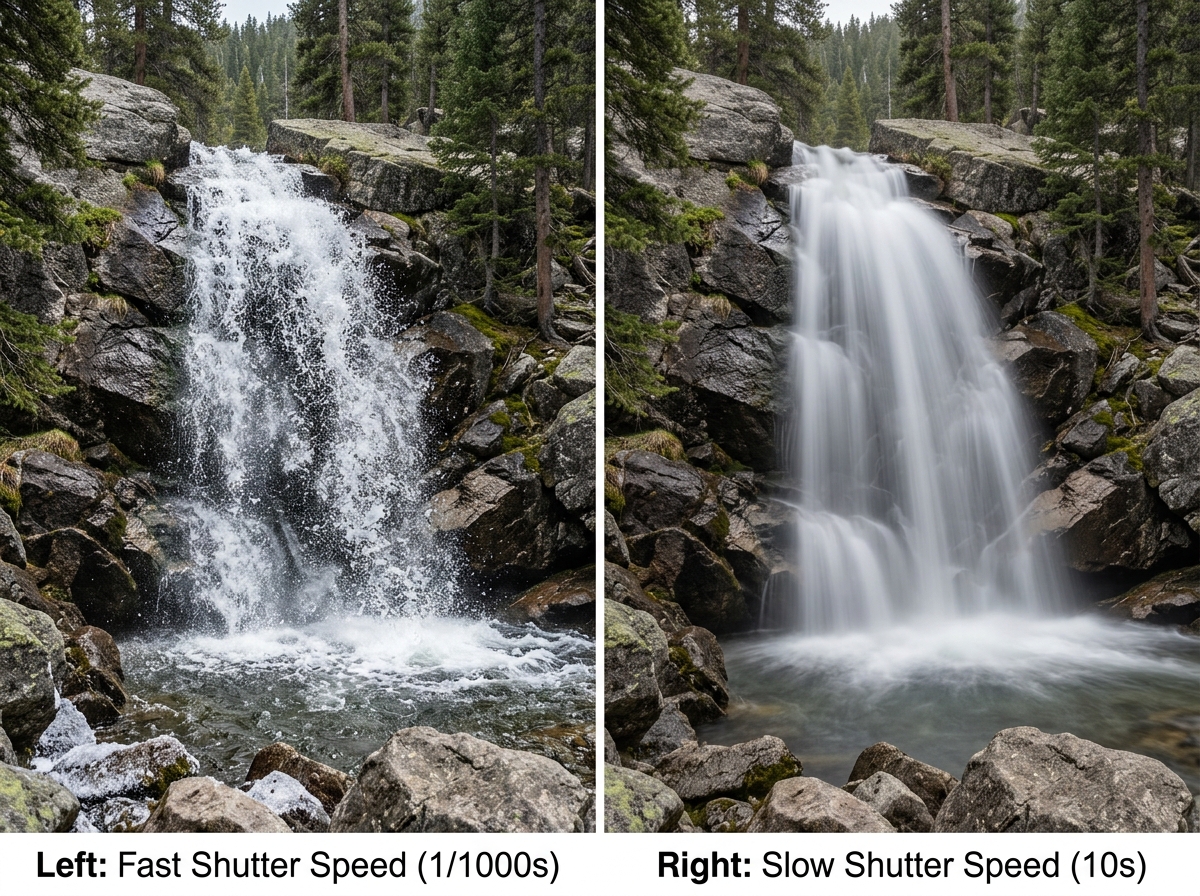
To truly master how to do long exposure photography, we need to peek under the hood of how a camera sees the world. Most photography is about “freezing” time. If a bird flies past at 1/2000th of a second, the camera captures a crisp, static moment. Long exposure does the opposite: it records the passage of time.
At its heart, this technique relies on shutter speed. The shutter is like a curtain in front of your camera’s sensor. In a normal photo, it blinks open and shut instantly. In long exposure, we leave that curtain open for seconds, minutes, or even hours.
During this time, the sensor is like a bucket catching rain. If the “rain” (light) comes from a stationary object like a rock or a building, the bucket fills up in one spot, creating a sharp image. But if the light comes from something moving—like a flowing river or a car—the light “smears” across the sensor as it moves. This creates that beautiful motion blur we’re after.
The secret to a great shot is the contrast between static and moving elements. If everything in your frame is moving, you’ll just get a blurry mess. But if you have a sharp, jagged cliffside surrounded by water that has been turned into a soft, ethereal mist, you create a visual story that the human eye can’t see on its own. This is the “magic” of light accumulation.
Essential Gear for Sharp Results
While you don’t need a Hollywood budget, long exposure is one of the few photography niches where specific gear is non-negotiable. Because the shutter stays open so long, even a microscopic vibration can ruin the shot.
- A Sturdy Tripod: This is your most important tool. If your camera moves even a fraction of a millimeter during a 30-second exposure, the whole image will be soft. We recommend a tripod that balances weight and stability—carbon fiber is excellent for dampening vibrations. If you’re caught without one, you can learn how to stabilize and shoot night sky photography without a tripod by using natural ledges or beanbags.
- Neutral Density (ND) Filters: Think of these as sunglasses for your lens. They block out light so you can use slow shutter speeds even in broad daylight. Without them, a 10-second exposure at noon would result in a completely white, overexposed image.
- Remote Shutter Release or Intervalometer: Pressing the shutter button with your finger causes “camera shake.” A remote release allows you to trigger the shot without touching the gear. If you don’t have one, use your camera’s 2-second or 10-second self-timer.
- Wide-Angle Lens: While any lens works, wide-angle lenses (like a 16-35mm or a 24mm) are favorites for landscapes because they capture more of the sky and foreground, emphasizing the movement of clouds and water.
- Extra Batteries: Long exposures eat battery life for breakfast. The sensor stays powered on for the entire duration of the shot, and “long exposure noise reduction” processing takes even more juice. Always carry spares!
ND Filter Comparison Table
| Filter Type | Light Reduction | Best Use Case |
|---|---|---|
| 3-Stop (ND8) | Reduces light by 8x | Golden hour, waterfalls, slight blurring |
| 6-Stop (ND64) | Reduces light by 64x | Bright overcast days, smoothing choppy water |
| 10-Stop (ND1000) | Reduces light by 1000x | Full daylight, extreme cloud streaking, removing people |
How to Do Long Exposure Photography: A Step-by-Step Guide
Ready to take the plunge? Follow this workflow to ensure you don’t miss a beat.
- Scout and Compose: Find a spot with movement (water, clouds, traffic). Set up your tripod and compose your shot before you put any filters on. Once a 10-stop filter is attached, the viewfinder will be too dark to see through!
- Switch to Manual Mode: You need total control. Set your ISO to 100 (its lowest native setting) to keep the image clean and noise-free.
- Set Your Aperture: For landscapes, f/8 to f/11 is usually the “sweet spot” for sharpness. Avoid going all the way to f/22, as this can actually make your image less sharp due to a phenomenon called diffraction.
- Take a Test Shot: Without any filters attached, take a normal photo. Check your histogram to ensure the exposure is balanced (not too dark, not too bright). Note the shutter speed the camera used for this “base” exposure.
- Focus and Lock: Use autofocus to get the shot sharp, then switch your lens to Manual Focus (MF). This “locks” the focus so the camera doesn’t try to hunt for focus in the dark once the filter is on.
- Add the Filter and Calculate: Attach your ND filter. Now, you must increase your shutter speed based on the filter’s strength. (We’ll cover the math in a moment!)
- Turn Off Stabilization: If your lens or camera has Image Stabilization (IS) or Vibration Reduction (VR), turn it OFF. When the camera is on a tripod, these systems can actually create blur by trying to compensate for movement that isn’t there.
- Fire the Shutter: Use your remote or timer. Then, wait for the magic to happen.
Mastering Focus in How to Do Long Exposure Photography
Focusing is the silent killer of long exposure shots. Because we often use dark filters, the camera’s autofocus system effectively goes blind.
The best technique is to focus on your subject—or at the hyperfocal distance (the point that keeps everything from the foreground to the horizon acceptably sharp)—before you ever touch your filters. Once you have that focus locked in, switching to manual focus ensures that the camera doesn’t reset the focus point when you hit the shutter button.
If you forget to do this and your image comes out blurry, it’s likely because the camera tried to autofocus through a 10-stop filter and failed, settling on a random, blurry distance.
Calculating Shutter Speed for How to Do Long Exposure Photography
This is where many people lose their minds, but it’s just simple multiplication. Each “stop” of a filter doubles the amount of time the shutter needs to stay open.
- If your test shot (without a filter) was 1/100th of a second:
- A 3-stop filter makes it 1/12th of a second.
- A 6-stop filter makes it 2/3rds of a second.
- A 10-stop filter makes it 10 full seconds.
If your base exposure is already slow—say, 1/2 a second—a 10-stop filter will push you into several minutes of exposure time. For anything longer than 30 seconds, you will need to switch your camera to Bulb Mode. In Bulb mode, the shutter stays open for as long as you hold the button down (which is why a remote release with a lock is essential).
If math isn’t your thing, there are dozens of “Long Exposure Calculator” apps that do the work for you. On mobile, you can even explore combining multiple exposures on phone for the perfect shot to simulate these long shutter speeds.
Creative Applications and Smartphone Techniques
Long exposure isn’t just for misty waterfalls. Once you know the basics, you can apply them to almost anything that moves.
- Light Trails: Head to a highway overpass at night. A 10–20 second exposure will turn car headlights into white streaks and taillights into red ribbons.
- Star Trails: By pointing your camera north and leaving the shutter open for 30 minutes (or stacking multiple shorter shots), you can capture the rotation of the Earth as stars “streak” across the sky. You can dive deeper into this with star trail image editing: a new dimension to the night sky.
- Cloud Streaking: On a windy day, a 2-minute exposure can make clouds look like they are exploding from the center of the frame, adding incredible drama to architectural shots.
- Removing Crowds: If you’re at a busy tourist landmark, a very long exposure (using a heavy ND filter) can actually make moving people disappear. Because they don’t stay in one spot long enough to register on the sensor, only the stationary building remains.
Long Exposure on Smartphones and iPhones
You don’t need a DSLR to play with time. Modern smartphones have become surprisingly capable.
On an iPhone, you can use the “Live Photo” feature. Take a Live Photo of a moving subject (like a fountain), open the photo in your gallery, and change the effect to “Long Exposure.” The phone will digitally blend the frames to create a motion blur effect.
For more control, we recommend using top mobile camera apps for long exposure shots like Slow Shutter Cam or Spectre. These apps allow you to manually set the “shutter speed” and are perfect for capturing the night with long exposure smartphone photography. Just remember: even with a phone, you still need a steady surface or a mobile tripod!
Troubleshooting Common Long Exposure Pitfalls
Even the pros mess up sometimes. Here are the most common “gotchas”:
- Light Leaks: On DSLRs, light can actually seep in through the viewfinder during long exposures, causing weird purple or magenta streaks. Most cameras come with a little plastic cap for the viewfinder, or you can just use a piece of black tape or your hat to cover it.
- Magenta Color Cast: Cheaper ND filters often have a “color cast,” meaning they make your whole image look slightly purple or blue. Shooting in RAW format allows you to easily fix this in post-processing by adjusting the White Balance.
- Wind Vibration: If it’s windy, your tripod might vibrate. Try hanging your camera bag from the center hook of your tripod to add weight and stability.
- Blurry Trees: If you’re shooting a landscape and the wind is blowing, the water will look great, but the trees will look like blurry green blobs. To fix this, you might need to take two shots—one fast for the trees and one long for the water—and blend them later.
- Sensor Heat: Very long exposures (over 5 minutes) can heat up your camera’s sensor, leading to “hot pixels” or digital noise. If this happens, let your camera cool down between shots.
Frequently Asked Questions about Long Exposure
Why are my long exposure photos completely white?
If your photo is a blank white square, you’ve overexposed it. This happens because too much light hit the sensor. To fix this, you need to either use a darker ND filter, use a narrower aperture (higher f-number), or shorten your shutter speed. If you are shooting in broad daylight without a filter, how to do long exposure photography becomes nearly impossible because the sensor will always be overwhelmed by light.
Can I do long exposure photography in broad daylight?
Yes, but you must use a Neutral Density filter. A 10-stop ND filter is the standard for daylight shooting. It reduces the light so significantly that a 1/1000th second shutter speed becomes a 1-second shutter speed, allowing you to blur movement even under the midday sun.
What is Bulb mode and when should I use it?
Most cameras have a hard limit of 30 seconds for shutter speed. If your calculations say you need a 2-minute exposure, you have to switch to Bulb (B) mode. In this mode, the shutter stays open for as long as the shutter button is depressed. Using a remote shutter release with a “lock” feature allows you to start the exposure and walk away until the time is up.
Conclusion
At Pratos Delícia, we believe that photography is about more than just documenting reality—it’s about expressing how a moment feels. Long exposure photography is the ultimate tool for that expression. It requires a bit of patience, a sturdy tripod, and a willingness to fail a few times before you get that “hero” shot.
Don’t be afraid to experiment. Try different shutter speeds on the same waterfall to see how the texture of the water changes. Watch the clouds and wait for the wind to pick up. The world looks different when you view it through a long lens and a slow shutter.
Ready to take your skills further? Master more techniques with our expert guides and start capturing the world in a way most people never see. Happy shooting!
